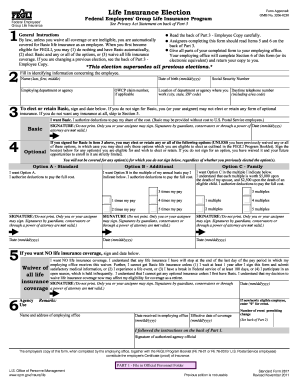
Natures by guardians, conservators or through a power of attorney are not valid.) SIGNATURE (Do not print. Only you or your assignee may sign. Signatures by guardians, conservators or through a power of attorney are not valid.) Date (mm/dd/yyyy) Date (mm/dd/yyyy) Date (mm/dd/yyyy) 5 If you want NO life insurance coverage, sign and date below. Waiver of all life insurance coverage 6 Agency Use I want NO life insurance coverage. I understand that any life insurance I have will stop at th.
Open form follow the instructions
Easily sign the form with your finger
Send filled & signed form or save
How to fill out the OPM SF 2817 online
The OPM SF 2817 is a vital form for employees enrolling in the Federal Employees' Group Life Insurance Program. This guide will provide step-by-step instructions to help users complete the form efficiently and accurately.
Follow the steps to successfully complete the OPM SF 2817 online.
- Click ‘Get Form’ button to obtain the form and open it in the editor.
- Fill in the identifying information concerning the employee, including their name (last, first, middle), date of birth (mm/dd/yyyy), and the employing department or agency. Additionally, provide the location of the department (city, state, ZIP code) and their daytime telephone number.
- In Section 3, indicate whether you want Basic coverage by signing and dating the form. If you do not sign for Basic, you cannot elect any optional insurance.
- Complete Section 4 if you wish to elect or retain optional insurance options. Sign the box(es) corresponding to Option A - Standard, Option B - Additional, or Option C - Family, confirming the full cost deduction.
- If you do not want any life insurance coverage, sign and date Section 5 to waive all coverage.
- Submit the completed form to your employing office. They will complete Section 6 and provide you with a copy of the finalized form.
- After submission, ensure to verify your coverage details on your future pay statements to confirm proper deductions.
Complete your OPM SF 2817 form online today to ensure your life insurance coverage is properly established.
Experience a faster way to fill out and sign forms on the web. Access the most extensive library of templates available.
Related content
An employee may at any time file an SF 2817 to waive or reduce coverage, unless the...
To waive coverage, you must complete SF-2817, Life Insurance Election Form. You will be...
... OPM 1>>endobj168 0 objstream. H R 0 ... sF dY . G g3*. : ~ Hv Qx_ A ? F k /...
Get answers to your most pressing questions about US Legal Forms API.
Can I change my Fegli coverage after retirement?
Unless you have assigned your Federal Employees Group Life Insurance, you may cancel it at any time, including after retirement. However, as a retiree you cannot increase your FEGLI coverage unless you are reemployed by the government. ...
Can I keep my Fegli coverage after retirement?
You must meet the five year/all opportunity requirement for Basic and each type of Optional insurance in order to continue it into retirement. For purposes of continuing FEGLI coverage into retirement, "service" means time in a position in which you were eligible for coverage.
How do I apply for federal retirement benefits?
Use form SF 3107, FERS Application for Immediate Retirement, to apply for immediate retirement. You can obtain the form from your employing agency. Submit the completed application to your employing agency. Give your agency at least 60 days notice before the date you intend to retire.
How do I get a SF 50 form?
How do I obtain a copy of my SF-50? Visit the National Archives website for information pertaining to replacement of the SF-50 or contact the agency's Human Resources Office where you worked for assistance.
What is a SF 2801 form?
This pamphlet, along with Standard Form (SF) 2801, Application for Immediate Retirement Under the Civil Service Retirement System, is for you if you are currently a Federal employee covered by the Civil Service Retirement System (CSRS), and you want to apply for retirement with an immediate annuity (annuity beginning ...
What is a SF 75 form?
Use the SF 75 to obtain pre-employment information when the applicant's Official Personnel Folder (OPF) or Merged Records Personnel Folder (MRPF) is not available for review. ... The SF 75 may not be used for any other purposes (such as to obtain references or to voucher a prospective employee).
Where do I send FERS beneficiary forms?
Submit the designation form to: Office of Personnel Management, Retirement Operations Center, P.O. Box 45, Boyers, PA 16017-0045.
When can I change my Fegli coverage?
Qualifying Life Events are marriage, divorce, death of spouse, or acquisition of an eligible child. To enroll or increase your FEGLI coverage based on a life event, submit an SF 2817 to your human resources office within 60 days after the life event.
What is the immediate retirement fund?
FERS Immediate Retirement is the most common type of retirement under the Federal Employee Retirement System (FERS). You are eligible for an immediate voluntary FERS Retirement if you have the right combination of age and years of creditable service. There are three combinations of age and service.
Can you opt out of Fegli?
Reducing or cancelling life insurance: You can reduce or cancel your FEGLI life insurance at any time, without waiting for an open season. If you are an employee, submit an SF 2817 to your human resources office, signing only for the coverage you want to keep.
Use professional pre-built templates to fill in and sign documents online faster. Get access to thousands of forms.
If you believe that this page should be taken down, please follow our DMCA take down process here.