Loading
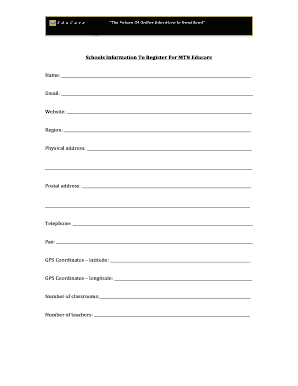
Get Mtn Educare Registration
How it works
-

Open form follow the instructions
-

Easily sign the form with your finger
-

Send filled & signed form or save
How to fill out the Mtn Educare Registration online
Completing the Mtn Educare Registration online is a straightforward process that requires accurate information. This guide provides step-by-step instructions to help users navigate through the registration form with ease.
Follow the steps to successfully register online
- Press the ‘Get Form’ button to access the registration form and open it for editing.
- Begin filling out the form by entering your full name in the designated field.
- Provide a valid email address to ensure you receive updates and confirmations regarding your registration.
- If applicable, include your website address to give additional context about your educational establishment.
- Specify the region where your school is located to help in categorizing the registration process.
- Enter the physical address of your school, ensuring accuracy for potential communication and verification.
- Fill in your postal address if it differs from your physical address to facilitate correspondence.
- List your school's telephone number and fax number for contact purposes.
- Provide the GPS coordinates by filling in both the latitude and longitude fields. This will assist in mapping your school's location.
- Indicate the number of classrooms available at your school to give a sense of the school's infrastructure.
- State the number of teachers employed at your institution to characterize the teaching staff.
- Summarize the requirements for international students, if applicable, in the section provided.
- Specify the curriculum being used, such as SGCSE, IGCSE, or HIGCSE.
- List the classes offered, such as Form I, Form II, etc., to inform about the educational stages available.
- Indicate the types of school, such as boys, girls, or co-educational.
- Describe the facilities available at your school, including amenities like a tennis court or computer lab.
- Outline the subjects offered across different classes to highlight the curriculum diversity.
- Provide details on school awards, including the date received and who awarded them.
- Enter the registration and tuition dates for each class category to inform potential enrollees.
- Upload school pictures with descriptions to provide visual context about your establishment.
- Include information about special programs offered by your school, such as charity projects or additional classes.
- Mention the number of students who progressed to higher education in the past years, categorized by local or international institutions.
- After reviewing all information, you may save changes, download the form, print it, or share it as needed.
Complete your Mtn Educare Registration online today and ensure your educational establishment is recognized.
Industry-leading security and compliance
US Legal Forms protects your data by complying with industry-specific security standards.
-
In businnes since 199725+ years providing professional legal documents.
-
Accredited businessGuarantees that a business meets BBB accreditation standards in the US and Canada.
-
Secured by BraintreeValidated Level 1 PCI DSS compliant payment gateway that accepts most major credit and debit card brands from across the globe.