O. Box 826880 Sacramento CA 94280-0001 EDD ACCOUNT NUMBER Corporation/ Owner s Name Business Name DBA Banking Institution PLEASE INDICATE CHANGES/CORRECTIONS THAT APPLY TO YOUR BUSINESS A-1 BELOW A. I further certify that I have the authority to sign on behalf of the above business. Phone Number Signature Print Name / / Date Title Officer Owner Member GP or Authorized Agent Manage your payroll tax account online File reports make deposits update addresses and much more. Enroll now for e-Services for Business at https //eddservices. edd. ca.gov. e-Services for Business. CHANGE OF EMPLOYER ACCOUNT INFORMATION Mail to Employment Development Department Account Services Group MIC 28 P. Address Change/Correction Date of Change NUMBER AND STREET / Enter address information in box 1 CITY STATE AND ZIP CODE PHONE NUMBER B. C. D. E* Business Name DBA Change Personal Name Change i*e* marriage Change of Ownership - Date of Change required Partial Sale Not Out-Of-Business Purchase Price OWNER S NAM....

Open form follow the instructions

Easily sign the form with your finger

Send filled & signed form or save
How to fill out the CA DE 24 online
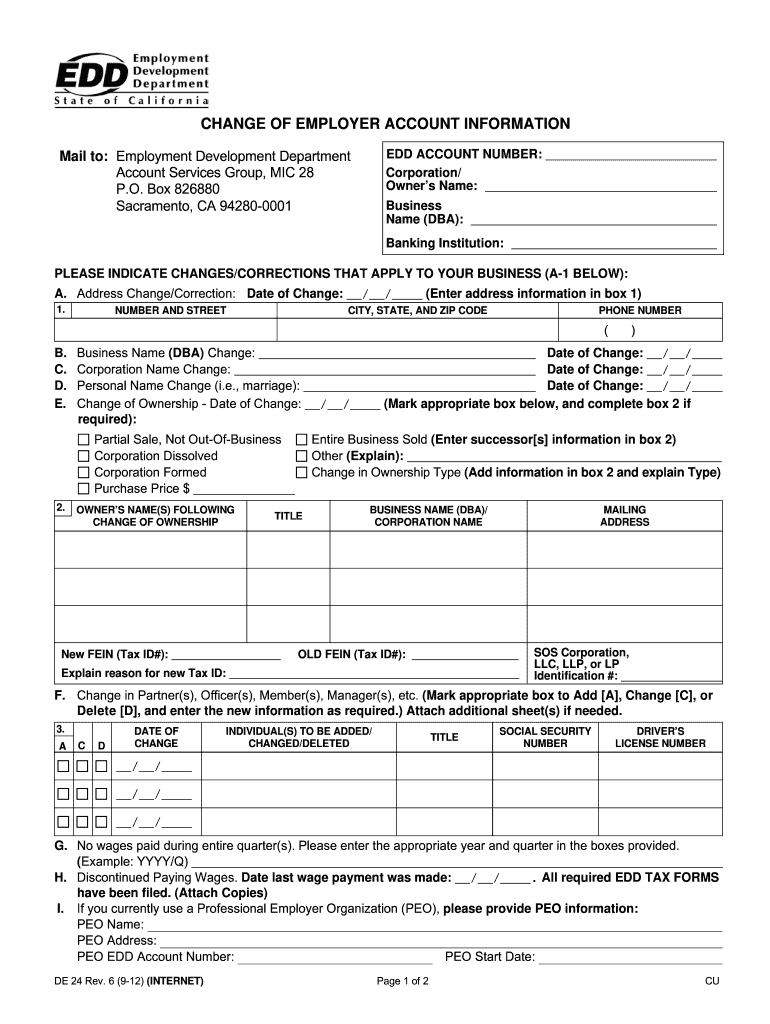
Filling out the CA DE 24 form is essential for updating your employer account information with the Employment Development Department. This guide provides a step-by-step walkthrough to assist users in completing the form accurately and efficiently.
Follow the steps to complete your CA DE 24 form online.
- Press the ‘Get Form’ button to obtain the form and open it in your editing tool.
- Enter your EDD account number at the top of the form to identify your account.
- Provide the corporation or owner’s name, followed by the business name (DBA) in the designated fields.
- Specify the banking institution used by your business.
- Indicate the changes or corrections that apply to your business in section A-1, selecting from options such as address change, business name change, and more.
- For an address change, fill in the number and street, city, state, and ZIP code along with the date of change.
- If applicable, fill in the new ownership details and the reason for a new Federal Employer Identification Number (FEIN).
- Mark any changes related to partners, officers, or members by selecting the suitable action (Add, Change, Delete) and provide the new information as required.
- If your business has no wages paid during the entire quarter, enter the appropriate year and quarter in the provided fields.
- Indicate if your business has discontinued paying wages and provide the date of the last wage payment.
- If using a Professional Employer Organization (PEO), fill in the PEO information as required.
- If your business is out of business, provide the date and forwarding address in box A-1.
- In the signature section, sign the form, print your name, provide the date, and include your title.
Complete your CA DE 24 form online today to manage your employer account efficiently.
Experience a faster way to fill out and sign forms on the web. Access the most extensive library of templates available.
Related content
The 2025 California Building Standards Code (Cal. Code Regs., Title 24) will be published...
CA-24. Volunteer Center. Nonprofit Agencies by Alphabet. Careers at Butler · Legal ·...
24 V AC +/- 20% (50/60 Hz). Corrente de entrada. (VIN em 24 V CA +/- 20%. Máx. 6 A...
Get answers to your most pressing questions about US Legal Forms API.
How to obtain an EDD number?
To obtain an EDD number, you must first file a claim for unemployment benefits or other services through EDD. After your application processes, you will receive your unique EDD number. For assistance with this process and to ensure you understand the requirements of CA DE 24, check out the helpful guides available at uslegalforms.
How do I speak to a live person at EDD Unemployment?
To speak to a live person at EDD Unemployment, call their designated phone line and follow the prompts. It may take some time to reach a representative due to high call volumes. If you find this process frustrating, uslegalforms offers resources that can help streamline your experience related to CA DE 24 issues.
What is a de4 form for California taxes?
The DE 4 form is a California Employee's Withholding Allowance Certificate. It's used by employees to let their employer know how much tax to withhold from their paychecks. You may need this form when dealing with various tax obligations, including those relevant to your CA DE 24 status, and uslegalforms can assist you in filling it out correctly.
How do I talk to a representative at EDD?
To talk to a representative at EDD, you can call their customer service number. Be prepared for potentially long hold times, especially during peak hours. If you want a smoother experience, consider utilizing the resources at uslegalforms, which can provide guidance on navigating EDD's services related to CA DE 24.
Can I go to the EDD office in person?
You can visit the EDD office in person, but it's important to check their operating hours and any requirements beforehand. During busy periods, wait times may be long, so consider scheduling an appointment if possible. For assistance related to CA DE 24, you can find helpful resources online, or you may want to explore user-friendly options at uslegalforms.
What documents do I need to submit to EDD?
When submitting to EDD, you'll typically need your Social Security number, proof of identity, income details, and any additional documentation related to your unemployment or benefits claim. Ensuring that all documents align with the CA DE 24 guidelines will improve your application's success rate. Having everything organized beforehand also makes the submission process smoother.
How do I submit documents to EDD?
Submitting documents to EDD can be accomplished through various methods such as online portals, mail, or in-person submissions. Be sure to prepare copies of all necessary forms and documents, particularly those related to CA DE 24 requirements. This preparation can help avoid delays in processing your claims or benefits.
How to file California corporate disclosure statement online?
Filing a California corporate disclosure statement online can be efficiently done through the California Secretary of State's website. You’ll need to gather necessary corporate documents, including your Articles of Incorporation. Following the streamlined process available online ensures that your filing meets CA DE 24 standards and is submitted on time.
How do I close my California employer account?
To close your California employer account, you need to file appropriate forms with the EDD. It's essential to ensure all tax obligations are settled before closing. Completing this process accurately will help you maintain compliance with CA DE 24. If you require assistance, consider reaching out to customer support or utilizing platforms like uslegalforms to help guide you through the steps.
What documents are needed for EDD verification?
For EDD verification, you will typically need proof of identity, such as your Social Security card, a government-issued ID, and proof of income or employment. Ensuring that all documents are accurate and current is crucial. Checking with CA DE 24 can help you prepare the right materials for verification to avoid delays in your benefits.
Use professional pre-built templates to fill in and sign documents online faster. Get access to thousands of forms.
If you believe that this page should be taken down, please follow our DMCA take down process here.