Loading
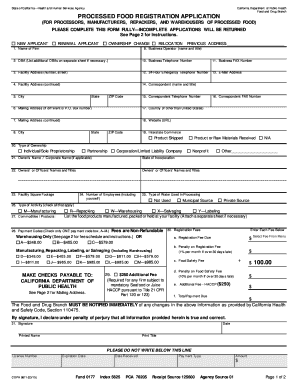
Get General Processed Food Registration Application. Cdph 8611 - Cdph Ca
How it works
-

Open form follow the instructions
-

Easily sign the form with your finger
-

Send filled & signed form or save
How to use or fill out the GENERAL PROCESSED FOOD REGISTRATION APPLICATION. CDPH 8611 - Cdph Ca online
Filling out the General Processed Food Registration Application is essential for processors, manufacturers, repackers, and warehouses of processed food. This guide provides a step-by-step approach to ensure you complete the application accurately and efficiently.
Follow the steps to successfully complete your application.
- Press the ‘Get Form’ button to acquire the application and open it in your preferred online editor.
- Indicate whether you are a new applicant, a renewal applicant, or if there is an ownership change by selecting the appropriate checkbox.
- Provide the 'Name of Firm' — enter the official name of your business or organization applying for registration.
- Complete the 'DBA' section if your business operates under a different name, using a separate sheet if you have multiple DBAs.
- Fill in the 'Facility Address,' including the number, street, city, state, and ZIP code where your operations are located.
- Enter your 'Mailing Address' if it differs from the facility address, including the P.O. Box number if necessary.
- List your 'Business Operator's name and title,' ensuring to provide accurate contact information for communication.
- Fill out your 'Business Telephone Number,' 'Business FAX Number,' and '24-Hour Emergency Telephone Number' to ensure continuous contact.
- Provide the 'E-Mail Address' for official communication regarding your application.
- List the name and title of the 'Correspondent' for any follow-up questions along with their contact information.
- Indicate 'Interstate Commerce' participation by checking the appropriate boxes based on your business activities regarding product shipment or receipt.
- Select the 'Type of Ownership' that represents your business structure from the provided options.
- Provide the 'Owner's Name / Corporate Name' and the state of incorporation if applicable.
- List the names and titles of 'Owners or Officers' associated with the firm.
- Enter the 'Facility Square Footage' to provide insight into the size of your operations.
- Complete the 'Number of Employees' section, including yourself, to reflect the workforce size.
- Indicate the 'Type of Water Used in Processing' by checking the relevant options provided.
- Select all applicable 'Type of Activity' options to accurately describe your business operations.
- List all 'Commodities / Products' handled through your facility and attach a separate sheet if necessary.
- Select the applicable 'Payment Code' option to identify the registration fee based on your activities and facilities.
- Fill in the 'Registration Fees' section, entering the amounts for registration fee, penalties, food safety fees, and any additional HACCP fees, ensuring to calculate total payment due accurately.
- Sign and date the application, providing your printed name and title to confirm the accuracy of the information provided.
- Once all fields are completed, save changes, download, or print your application to ensure you have a copy for your records before submission.
Complete your application online to ensure a smooth and efficient registration process.
To operate a home-based food business in California, you must complete a California Department of Public Health food processor course within three months of obtaining your cottage food permit. After you complete the course, hold onto the food handler card or certificate as proof that you completed the training.