Loading
Get Student Profile Form
How it works
-

Open form follow the instructions
-

Easily sign the form with your finger
-

Send filled & signed form or save
How to fill out the Student Profile Form online
Filling out the Student Profile Form online is a straightforward process designed to capture essential information needed for your training. This guide will provide you with clear, step-by-step instructions to ensure a smooth completion of the form.
Follow the steps to successfully complete the Student Profile Form online
- Click ‘Get Form’ button to obtain the form and open it in the editor.
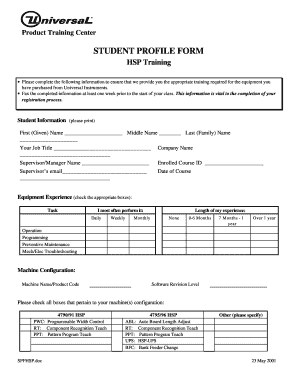
- Begin by entering your student information in the designated fields. Start with your first (given) name, middle name (if applicable), and last (family) name.
- Next, fill in your job title, ensuring that you specify your current role accurately.
- Provide your company name in the appropriate field.
- Include the name of your supervisor or manager to establish your current working relationship.
- Enter the enrolled course ID that corresponds to the training you are attending.
- List your supervisor’s email address to facilitate communication regarding your training.
- Specify the date of your course to help organize the training schedule.
- In the Equipment Experience section, check the boxes that reflect how often you perform tasks related to the equipment: Daily, Weekly, Monthly, or indicate if you have no experience.
- Indicate the length of your experience from the provided options such as 0-6 Months, 7 Months - 1 Year, or Over 1 Year.
- Describe your machine configuration by entering the machine name/product code and other relevant details.
- Check all applicable boxes related to your machine's configuration to share comprehensive information.
- Once you have filled in all the necessary fields, review the form for accuracy and completeness.
- Save your changes, and you may also choose to download, print, or share the filled form as needed.
Complete your Student Profile Form online today to ensure a successful training experience.
How to Build a Professional Student LinkedIn Profile. Accurately fill in your profile information. Display an appropriate photo. Show off your education. Develop a professional summary statement. Fill your “Skills” section with keywords. Update your status weekly.
Industry-leading security and compliance
US Legal Forms protects your data by complying with industry-specific security standards.
-
In businnes since 199725+ years providing professional legal documents.
-
Accredited businessGuarantees that a business meets BBB accreditation standards in the US and Canada.
-
Secured by BraintreeValidated Level 1 PCI DSS compliant payment gateway that accepts most major credit and debit card brands from across the globe.