Loading
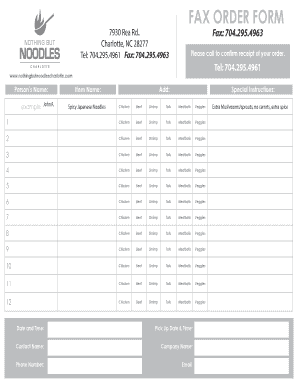
Get Noodles Co Fax Form
How it works
-

Open form follow the instructions
-

Easily sign the form with your finger
-

Send filled & signed form or save
How to fill out the Noodles Co Fax Form online
This guide provides a clear and comprehensive overview of how to fill out the Noodles Co Fax Form online. Follow the steps outlined below to ensure your order is submitted accurately and efficiently.
Follow the steps to fill out the Noodles Co Fax Form
- Click ‘Get Form’ button to obtain the form and open it in the editor.
- Enter the person’s name in the designated field. This should reflect the full name of the individual placing the order, for example, John A.
- Select the item name from the drop-down options provided. Ensure you accurately choose the meal you wish to order, such as Spicy Japanese Noodles.
- In the 'Add' section, you can include any special instructions related to your order, such as specific dish modifications (e.g., extra mushrooms, no carrots, extra spice).
- For the protein choices, you will find multiple sections to specify your preferences for each of the first ten items. Choose from Chicken, Beef, Shrimp, Tofu, Meatballs, or Veggies as suitable.
- Fill in the date and time for when you would like to pick up your order. Be sure to provide accurate and clear information regarding your preferred pickup time.
- Enter your contact name, company name (if applicable), phone number, and email address. Make sure all contact information is correct to avoid any issues with your order.
- After completing all sections of the form, review your entries for accuracy.
- Finally, save your changes, download a copy of the completed form, and print or share it as necessary. You may also want to call to confirm receipt of your order.
Complete your order by filing out the Noodles Co Fax Form online today!
If you have an account with Noodles on or through the Site or Mobile App, you may review and change your information by logging into your account and editing your profile, via email by contacting us at guestrelations@noodles.com, by calling 720-214-1900.