Loading
Form preview
  • US Legal Forms
  • Other Templates
  • Foreign Forms
  • Foreign UK Other Forms
  • Uk Nhs My Birth Plan

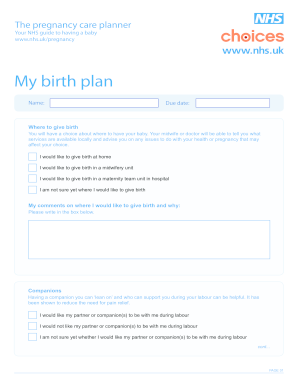
Get Uk Nhs My Birth Plan

Use equipment such as mats or beanbags during labour My comments on birthing equipment and whether I will provide it: Please write in the box below. Special facilities Some units may offer you special facilities such as a birthing pool. Some have special rooms called LDRP rooms (labour, delivery, recovery, postnatal rooms) where you stay in the same room until you leave the hospital. Your midwife will be able to tell you what’s available. I would like to use a special LDRP room, if availabl.

How it works

  1. Open form

    Open form follow the instructions

  2. Easily sign form

    Easily sign the form with your finger

  3. Share form

    Send filled & signed form or save

How to fill out the UK NHS My Birth Plan online

Filling out the UK NHS My Birth Plan is an important step in preparing for childbirth. This guide provides comprehensive and user-friendly instructions on how to complete the form online, ensuring your preferences and needs are clearly communicated to your care team.

Follow the steps to successfully complete your birth plan online.

  1. Press the ‘Get Form’ button to access the UK NHS My Birth Plan and open it in your preferred editing tool.
  2. Enter your name in the designated field. This information helps identify your birth plan.
  3. Fill in your due date to provide vital information for your healthcare provider.
  4. Choose your preferred location for giving birth by selecting one of the options: home, midwifery unit, maternity team unit in hospital, or if you are unsure.
  5. In the comments box, elaborate on your preference for where you would like to give birth and any reasons for your choice.
  6. Indicate your preference regarding companions during labour by selecting one of the available options or expressing uncertainty.
  7. Provide the name of your birth partner or companion in the designated box.
  8. Express your wishes regarding companions during potential forceps or vacuum deliveries, selecting from the provided options.
  9. State your preferences for companions during a caesarean section, again choosing from the available options.
  10. Outline any birthing equipment you plan to use, such as mats or beanbags, and provide comments in the box provided.
  11. Select your interest in special facilities like birthing pools or LDRP rooms, as well as adding any comments.
  12. Fill out your preferences regarding monitoring during labour and any comments about this process.
  13. Express your preferences for keeping active during labour by selecting the appropriate option.
  14. Choose the positions you prefer for labour and birth, allowing for multiple selections.
  15. Indicate your preference for skin-to-skin contact with your baby after birth, providing additional comments if needed.
  16. Discuss your thoughts on having midwives, nurses, or doctors in training present during labour.
  17. Fill out your preferences regarding pain relief options by selecting the methods you wish to try.
  18. Express your feelings about the possible need for an episiotomy.
  19. Specify your preferences regarding delivering the placenta and whether you have discussed this with your midwife.
  20. Indicate how you plan to feed your baby and any comments related to this choice.
  21. Discuss and provide consent for the administration of vitamin K to your baby.
  22. Specify any special requirements if applicable, and add general comments as needed.
  23. Once all sections are completed, save your changes, and download or print the form as needed. You also have the option to share it with your healthcare team.

Start preparing your birth experience by completing your UK NHS My Birth Plan online today.

Get form

Experience a faster way to fill out and sign forms on the web. Access the most extensive library of templates available.
Get form

Related content

Does the birth plan match what is relevant to...
by I Artieta-Pinedo · 2024 · Cited by 2 — A birth plan is intended to be a tool for...
Learn more
(DOC) Natural birth letter
The document outlines a birth plan emphasizing patient autonomy and preferences during...
Learn more
Antenatal Booking Form
This section is to record details of your previous pregnancies, including miscarriages and...
Learn more

Related links form

MN CNP 387 2015 MN wq-wwists4-31 2014 MO 780-1972 2019 MO Anthem Individual Enrollment Application 2016

Questions & Answers

Get answers to your most pressing questions about US Legal Forms API.

Contact support

Include your preferences for labor, delivery, and postpartum care in your birth plan. Consider aspects such as pain management, positions during labor, and the presence of loved ones. A comprehensive UK NHS My Birth Plan articulates your desired experience, ensuring you feel supported and empowered throughout the process.

The NHS offers various birth choices, including home births, midwifery-led units, and hospital deliveries. You have the option to choose your preferred method of pain relief, whether it's gas and air, epidurals, or natural methods. By documenting your preferences in a UK NHS My Birth Plan, you can clearly communicate your choices to your care team.

To ensure your wishes are respected, bring at least three copies of your birth plan: one for yourself, one for the midwife or doctor, and another for the hospital staff. More copies can help if you have additional caregivers present. This way, your UK NHS My Birth Plan can be easily shared and understood by everyone involved.

Filling out a birth plan involves reflecting on your preferences and priorities for the birth experience. Start by listing your wishes for labor, delivery, and postpartum care. Using resources like US Legal Forms can simplify this process, ensuring your UK NHS My Birth Plan is comprehensive and easy to understand.

Your birth plan should be detailed enough to communicate your preferences clearly without overwhelming the reader. Focus on your key choices such as pain management, preferred positions during labor, and who you want present. A well-structured UK NHS My Birth Plan balances clarity and essential details to support your birth experience.

You should bring several copies of your birth plan to ensure all key personnel are informed of your preferences. Typically, having at least three copies is advisable; one for yourself, one for your birthing team, and one for the hospital's records. Remember, integrating your UK NHS My Birth Plan helps everyone understand your wishes.

The golden hour after birth is the first hour of life when newborns benefit from skin-to-skin contact with their mothers. This intimate bonding experience helps regulate the baby's body temperature and promotes breastfeeding. By including this in your UK NHS My Birth Plan, you can express your desire for immediate contact after delivery.

Most expectant parents begin birthing classes between weeks 30 and 36 of their pregnancy. These classes provide essential information about labor, delivery, and newborn care. Aligning your learnings with your UK NHS My Birth Plan ensures you are well-prepared and confident for the upcoming experience.

Start preparing for birth around week 30 of your pregnancy. During this time, gather necessary supplies, finalize your birth plan, and attend prenatal checkups. The UK NHS My Birth Plan can be a vital tool as it helps you map out your journey and ensures you have addressed crucial points ahead of time.

You should begin your birthing plan around the start of your third trimester, usually around week 28. This timeframe allows you to incorporate any feedback from your healthcare provider and make any necessary adjustments. Be sure to detail your preferences in the UK NHS My Birth Plan for a smooth delivery.

Get This Form Now!

Use professional pre-built templates to fill in and sign documents online faster. Get access to thousands of forms.
Get form
If you believe that this page should be taken down, please follow our DMCA take down processhere.
Get UK NHS My Birth Plan
Get form
  • Adoption
  • Bankruptcy
  • Contractors
  • Divorce
  • Home Sales
  • Employment
  • Identity Theft
  • Incorporation
  • Landlord Tenant
  • Living Trust
  • Name Change
  • Personal Planning
  • Small Business
  • Wills & Estates
  • Packages A-Z
  • Affidavits
  • Bankruptcy
  • Bill of Sale
  • Corporate - LLC
  • Divorce
  • Employment
  • Identity Theft
  • Internet Technology
  • Landlord Tenant
  • Living Wills
  • Name Change
  • Power of Attorney
  • Real Estate
  • Small Estates
  • Wills
  • All Forms
  • Forms A-Z
  • Other Templates
  • Legal Hub
  • About Us
  • Help Portal
  • Legal Resources
  • Blog
  • Affiliates
  • Contact Us
  • Delete My Account
  • Site Map
  • Industries
  • Forms in Spanish
  • Localized Forms
  • State-specific Forms
  • Forms Kit
  • Real Estate Handbook
  • All Guides
  • Notarize
  • Incorporation services
  • For Consumers
  • For Small Business
  • For Attorneys
  • USLegal
  • FormsPass
  • pdfFiller
  • signNow
  • altaFlow
  • DocHub
  • Instapage
Form Packages
  • Adoption
  • Bankruptcy
  • Contractors
  • Divorce
  • Home Sales
  • Employment
  • Identity Theft
  • Incorporation
  • Landlord Tenant
  • Living Trust
  • Name Change
  • Personal Planning
  • Small Business
  • Wills & Estates
  • Packages A-Z
Form Categories
  • Affidavits
  • Bankruptcy
  • Bill of Sale
  • Corporate - LLC
  • Divorce
  • Employment
  • Identity Theft
  • Internet Technology
  • Landlord Tenant
  • Living Wills
  • Name Change
  • Power of Attorney
  • Real Estate
  • Small Estates
  • Wills
  • All Forms
  • Forms A-Z
  • Other Templates
Customer Service
  • Legal Hub
  • About Us
  • Help Portal
  • Legal Resources
  • Blog
  • Affiliates
  • Contact Us
  • Delete My Account
  • Site Map
  • Industries
  • Forms in Spanish
  • Localized Forms
  • State-specific Forms
  • Forms Kit
Legal Guides
  • Real Estate Handbook
  • All Guides
Prepared for you
  • Notarize
  • Incorporation services
Our Customers
  • For Consumers
  • For Small Business
  • For Attorneys
Our Sites
  • USLegal
  • FormsPass
  • pdfFiller
  • signNow
  • altaFlow
  • DocHub
  • Instapage
Social Media
Call us now toll free:
+1 833 426 79 33
As seen in:
© Copyright 1999-2026 airSlate Legal Forms, Inc. 17 Station Street, Suite 303, Brookline, MA 02445
  • Your Privacy Choices
  • Terms of Service
  • Privacy Notice
  • Content Takedown Policy
  • Bug Bounty Program