Loading
Get Gip 1022 Excel
How it works
-

Open form follow the instructions
-

Easily sign the form with your finger
-

Send filled & signed form or save
How to fill out the Gip 1022 Excel online
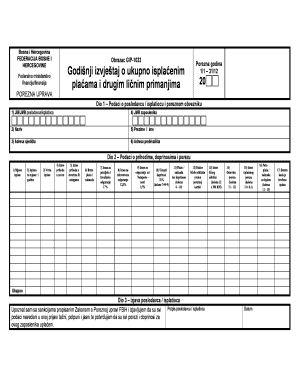
Filling out the Gip 1022 Excel form is essential for reporting annual salary and personal income details. This guide provides clear, step-by-step instructions to help users complete the form accurately online.
Follow the steps to complete the Gip 1022 Excel form effectively.
- Click ‘Get Form’ button to obtain the form and open it in the editor.
- In Part 1, provide details about the employer or payer. Enter the Employer's Identification Number (JIB/JMB), name, and address of the employer in the designated fields.
- Fill in the employee's JMB number, full name, and residential address in the appropriate sections of Part 1.
- Proceed to Part 2, where you will report income details. For each month of payment, enter the payment month, type of payment, and the amount received in cash as well as in goods or services.
- Complete the gross salary or compensation field, and calculate the amounts for retirement and disability insurance, health insurance, and unemployment insurance by entering the respective percentages.
- Calculate the total contributions and the net salary after contributions by subtracting total contributions from the gross salary.
- In this section, also fill in the personal deduction factor according to the tax card and the amount of personal deduction calculated.
- Proceed to calculate the tax base and the amount of tax paid, using the formulas laid out in the form.
- Finally, in Part 3, the employer or payer must sign the declaration affirming that all information provided is accurate and complete. Date the form appropriately.
- After all sections are completed, users can save changes, download the form, print it, or share it as needed.
Complete your Gip 1022 Excel document online for accurate reporting.
Industry-leading security and compliance
US Legal Forms protects your data by complying with industry-specific security standards.
-
In businnes since 199725+ years providing professional legal documents.
-
Accredited businessGuarantees that a business meets BBB accreditation standards in the US and Canada.
-
Secured by BraintreeValidated Level 1 PCI DSS compliant payment gateway that accepts most major credit and debit card brands from across the globe.