Loading
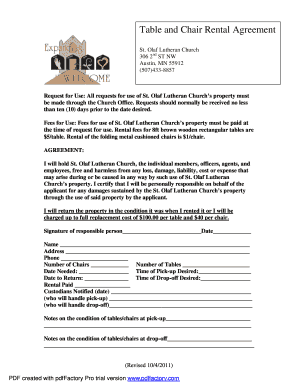
Get Table And Chair Rental Agreement Template
How it works
-

Open form follow the instructions
-

Easily sign the form with your finger
-

Send filled & signed form or save
How to fill out the Table and Chair Rental Agreement Template online
Filling out the Table and Chair Rental Agreement Template online can streamline the process of securing rental items for your event. This guide will walk you through each section of the form, ensuring that you understand how to provide all necessary information accurately.
Follow the steps to complete the rental agreement seamlessly.
- Click ‘Get Form’ button to obtain the form and open it in the editor.
- Begin by entering the date needed for the rental in the specified field. This indicates when you require the tables and chairs.
- Specify the time of pick-up desired. This information helps the rental facility prepare for your arrival.
- Input the date for returning the rented items. This ensures scheduling for the end of your rental period.
- Indicate the time for drop-off in the designated area. Accurate timing assists with organization at the rental facility.
- Fill out the number of chairs and tables you wish to rent. Be sure to check the pricing listed for accuracy.
- Enter your name, address, and phone number in the appropriate fields to ensure accurate identification.
- Sign the agreement to confirm your understanding of the conditions outlined, regarding damages and responsibilities.
- After completing the form, review all entries for correctness. Make any necessary adjustments.
- Once satisfied, save changes, download, print, or share the completed form from the editor.
Start filling out your Table and Chair Rental Agreement Template online today to secure your rental for your upcoming event.
Does Microsoft Word have a lease agreement template? Yes, Microsoft Word has a free lease agreement template that you can customize to create your own contract and minimize any potential problems between tenant and landlord.