Loading
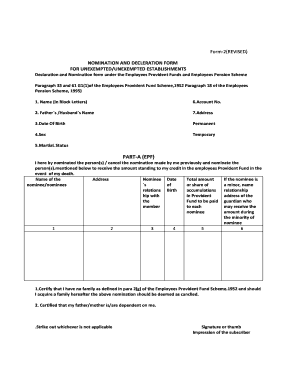
Get Uistech In Online
How it works
-

Open form follow the instructions
-

Easily sign the form with your finger
-

Send filled & signed form or save
How to fill out the Uistech In Online online
Filling out the Uistech In Online form can seem daunting, but this guide aims to simplify the process for you. Follow the step-by-step instructions to ensure that you complete the form accurately and effectively.
Follow the steps to successfully complete the Uistech In Online form
- Press the 'Get Form' button to access the Uistech In Online form and open it in the available editor.
- Begin by entering your name in block letters as requested in the first field. This ensures that your name is clear and easy to read.
- In the second field, provide your father's or partner's name as required.
- Fill in your date of birth in the designated space. Make sure to use the appropriate format.
- Indicate your sex by selecting the appropriate option provided on the form.
- Next, input your marital status in the respective field to clarify your current relationship status.
- In Part A (EPF), nominate your chosen person or persons to receive your provident fund in case of your demise. Provide all required details, including their name, address, date of birth, relationship with you, and the total amount to be paid.
- If your nominee is a minor, you will also need to provide the name and address of their guardian.
- Review the certification statements and select applicable options stating if you have no family or if your parents are dependent on you. Mark or strike through as needed.
- Sign or provide a thumb impression in the specified area to validate your nomination.
- Proceed to Part B (EPS) and enter the particulars of your family members who would be eligible for a widow or children's pension in the event of your death. List their names, addresses, dates of birth, and relationships.
- Once completed, certify if you have no family as defined in the Employee Pension Scheme. Make sure to sign or provide your thumb impression again.
- The employer or an authorized officer must then certify your declaration by signing and providing their details along with the establishment's name and address.
- Finally, after confirming all fields are filled accurately, you may save your changes, download, print, or share the completed form as needed.
Complete your Uistech In Online form efficiently by following these instructions and ensure all necessary details are accurately filled out.
Experience wise Urmila Info Solution Computer Operator/Data Entry Operator salaries in Patna ExperienceAvg Annual Salary6 years(1 salary)₹2.5 Lakhs ₹2.5 L/yr - ₹2.5 L/yr13 years(1 salary)₹2.8 Lakhs ₹2.8 L/yr - ₹2.8 L/yr14 years(1 salary)₹2.8 Lakhs ₹2.8 L/yr - ₹2.8 L/yr