Loading
Get Nita Form
How it works
-

Open form follow the instructions
-

Easily sign the form with your finger
-

Send filled & signed form or save
How to fill out the Nita Form online
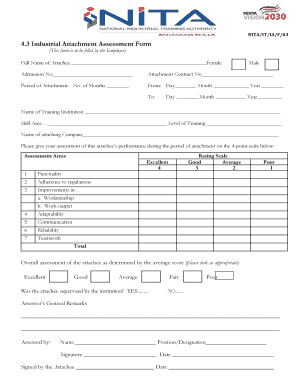
The Nita Form is a crucial document used to assess the performance of individuals during their industrial attachment. Completing this form accurately is essential for proper evaluation and feedback.
Follow the steps to fill out the Nita Form efficiently
- Press the ‘Get Form’ button to access the form and open it in your online editor.
- Begin by entering the full name of the attachee in the designated space. Select their gender by marking either 'Female' or 'Male'.
- Fill in the admission number and the attachment contract number as required.
- Indicate the period of attachment by specifying the number of months and including the start and end dates.
- Provide the name of the training institution and detail the skill area along with the level of training.
- Complete the name of the attaching company where the attachee performed their attachment.
- Assess the attachee’s performance by using the provided rating scale. Rate punctuality, adherence to regulations, workmanship, work output, adaptability, communication, reliability, and teamwork.
- Calculate the total score by averaging the ratings given in the assessment areas.
- Mark the overall assessment of the attachee based on the calculated average score, selecting from excellent, good, average, fair, or poor.
- Indicate if the attachee was supervised by the institution by selecting 'Yes' or 'No'.
- In the section for general remarks, provide any additional comments regarding the attachee’s performance.
- Complete the assessor's details by entering their name, position/designation, and signing with the date.
- Finally, ensure the attachee also signs and dates the form to confirm their assessment.
- Once completed, save your changes, download the form, print it, or share it as needed.
Take the next step in your digital document management by completing necessary forms online.
Nita as a girl's name is of Hebrew origin meaning "Grace".