Loading
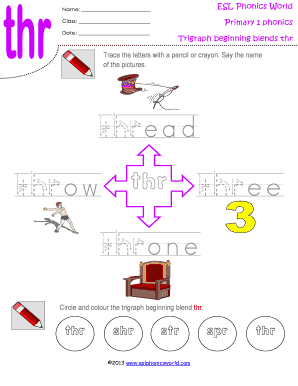
Get Trigraph Beginning Blends-thr Worksheet 6.pdf
How it works
-

Open form follow the instructions
-

Easily sign the form with your finger
-

Send filled & signed form or save
How to fill out the Trigraph Beginning Blends-thr Worksheet 6.pdf online
Filling out the Trigraph Beginning Blends-thr Worksheet 6.pdf online is a straightforward process. This guide will help you navigate each section of the worksheet with confidence and clarity, ensuring that you complete it accurately and efficiently.
Follow the steps to fill out the worksheet online.
- Click ‘Get Form’ button to obtain the form and open it in the editor.
- Identify the name section at the top of the form. Enter your name in the space provided.
- Locate the 'Class' field and input the relevant class information corresponding to the worksheet.
- In the 'Date' section, enter the current date using the format required by the form.
- Focus on the section labeled 'Trigraph beginning blends thr'. Use a pencil or crayon to trace the letters provided in the space.
- As you trace, say the names of the pictures listed (thread, throw, three, throne) to reinforce the learning.
- Next, circle and color the trigraph beginning blend 'thr' in the provided options. This includes recognizing and correcting the other blends present.
- Review your work to ensure that all necessary fields are completed correctly.
- Once finished, save changes to your form, and choose to download, print, or share it as needed.
Complete your worksheets online to enhance your learning experience.