Loading
Get Trs Cf5502b 2012-2026
How it works
-

Open form follow the instructions
-

Easily sign the form with your finger
-

Send filled & signed form or save
How to fill out the TRS CF5502B online
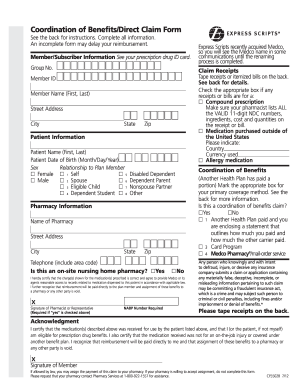
The TRS CF5502B form is essential for submitting prescription drug claims, particularly under coordination of benefits. This guide provides clear, step-by-step instructions to help users successfully complete the form online.
Follow the steps to fill out the TRS CF5502B form accurately.
- Click ‘Get Form’ button to obtain the form and open it in the editor.
- In the Member/Subscriber Information section, fill in your member ID, member name (first and last), street address, city, state, and zip code. Ensure all details are accurate as this information identifies you.
- Proceed to the Patient Information section. Enter the patient’s name (first and last), date of birth (month/day/year), sex, and their relationship to you as the plan member. Use the appropriate option from the given list.
- In the Pharmacy Information section, provide the name of the pharmacy, street address, city, state, zip code, and telephone number (including area code). If applicable, indicate whether this is an on-site nursing home pharmacy.
- For Claim Receipts, tape your itemized bills or receipts on the back of the form. Make sure they include essential details like the date prescription was filled, pharmacy name, doctor’s name or ID number, NDC number, name of drug and strength, quantity, prescription number, and the total amount paid.
- If applicable, complete the Coordination of Benefits section by marking whether another health plan has paid a portion, and provide details as necessary.
- Sign and date the acknowledgment section to certify that the medication was received and that you are eligible for benefits. This is crucial for processing your claim.
- After completing all sections and attaching all necessary receipts, save your changes, and choose the option to download, print, or share the completed form as needed.
Ensure swift processing of your claims by completing the TRS CF5502B form online today.
Related links form
To appeal an Express Scripts denial, you must submit a formal request for reconsideration. Start by collecting all pertinent information related to your case, including details about your TRS CF5502B. Write a clear and concise appeal letter outlining why you believe the denial should be overturned and include any supporting documentation. Remember to keep copies of everything you send for your records.