Loading
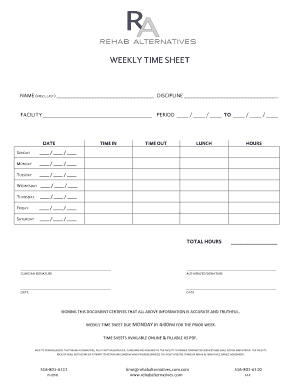
Get Rehab Alternatives Timesheet
How it works
-

Open form follow the instructions
-

Easily sign the form with your finger
-

Send filled & signed form or save
How to fill out the Rehab Alternatives Timesheet online
Filling out the Rehab Alternatives Timesheet is an essential step for documenting work hours accurately. This guide provides step-by-step instructions to help users complete the timesheet online with confidence.
Follow the steps to complete the timesheet with ease.
- Click 'Get Form' button to obtain the form and open it in your preferred editor.
- Begin by entering your name (first and last) in the designated field at the top of the form.
- Fill in your discipline alongside the facility name before specifying the period covered by the timesheet with the corresponding dates.
- Proceed to the day-by-day section, starting with Sunday. Enter the date, and fill in the corresponding 'Time In,' 'Time Out,' 'Lunch,' and 'Hours' fields for each day of the week.
- Continue this process for each day from Sunday through Saturday, ensuring all information is entered accurately.
- Once all daily entries are complete, calculate the total hours worked for the week and enter this in the specified 'Total Hours' field.
- Complete the clinician signature and authorized signature sections, along with the date fields, indicating that all information is accurate and truthful.
- Finally, save your changes, download, print, or share the completed form as needed.
Complete your documents online today for an organized and efficient workflow.