Loading
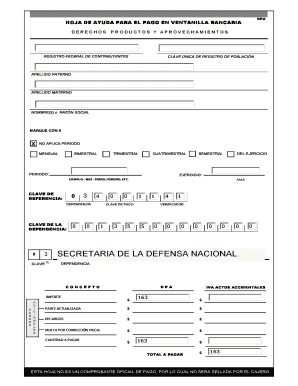
Get Hoja De Ayuda Para Pago En Ventanilla Bancaria
How it works
-

Open form follow the instructions
-

Easily sign the form with your finger
-

Send filled & signed form or save
How to fill out the Hoja De Ayuda Para Pago En Ventanilla Bancaria online
The Hoja De Ayuda Para Pago En Ventanilla Bancaria is an essential document for making payments through a bank window. This guide will help users understand each section of the form and provide step-by-step instructions for completing it online.
Follow the steps to successfully complete the form online.
- To obtain the form, click the ‘Get Form’ button and open it in your preferred editor.
- Begin by entering your Registro Federal de Contribuyentes and Clave Única de Registro de Población in the respective fields. These identifiers are crucial for processing your payment.
- Fill in your last names, followed by your first name(s) or Razon Social. Ensure the names are accurately spelled to avoid issues.
- In the selection box, mark with an 'X' the applicable payment period, such as mensal, bimestral, or semestral. Choose the correct duration based on your needs.
- Indicate the exercise year and specify the month (e.g., January, February, etc.) for which you are making the payment.
- Enter the reference key and the relevant departmental code in the designated sections. Ensure that all numbers are entered correctly and clearly.
- In the Importe section, include any charges that apply, such as additional fees or taxes. Calculate the total amount to be paid carefully.
- Finally, review all filled sections for accuracy. Once satisfied, save your changes and download the form. You can choose to print or share it as needed.
Complete your Hoja De Ayuda Para Pago En Ventanilla Bancaria online today to ensure your payment is processed smoothly.
¿Qué debe incluir un recibo de pago? El encabezado debe contener el concepto 'Comprobante de pago' escrito de la forma más clara posible. ... Datos fiscales, razón social y/o nombre de la persona que emite el recibo. Fecha en la que se realiza la transacción. Número del documento.