Loading
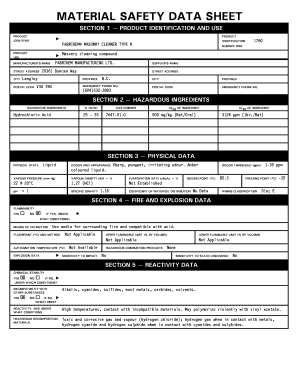
Get Fabrikem Masonry Cleaner Type R Msds
How it works
-

Open form follow the instructions
-

Easily sign the form with your finger
-

Send filled & signed form or save
How to fill out the Fabrikem Masonry Cleaner Type R MSDS online
This guide provides a detailed overview of how to effectively complete the Fabrikem Masonry Cleaner Type R Material Safety Data Sheet (MSDS) online. Each section of the form is explained to ensure users can fill it out accurately and efficiently.
Follow the steps to fill out the MSDS accurately.
- Press the ‘Get Form’ button to access the MSDS and open it for editing.
- In Section 1, enter the product identifier as 'Fabrikem® Masonry Cleaner Type R' along with the manufacturer's name, address, and emergency contact information. Ensure all fields are filled out completely.
- Move to Section 2 and list the hazardous ingredients. For example, provide the % (w/w) for hydrochloric acid and its CAS number. Include LD50 and LC50 values where applicable.
- In Section 3, document the physical state, color, odor, and relevant physical data points such as vapor pressure, evaporation rate, pH, and specific gravity. This information helps users understand the product's characteristics.
- Section 4 requires details about fire and explosion data. Note flammability, flashpoint, and means of extinction clearly. Be thorough in response to any conditions that could present hazards.
- Proceed to Section 5 to describe chemical stability and reactivity data. Include compatibility with other substances and possible hazardous decomposition materials.
- In Section 6, outline the toxicological properties. Specify routes of entry and effects of acute and chronic exposure, including irritancy and potential hazards.
- Section 7 involves preventive measures such as personal protective equipment and handling procedures. Ensure to highlight the waste disposal and storage requirements.
- For Section 8, provide specific first aid measures pertinent to the chemical exposure scenarios detailed in earlier sections.
- Finally, fill in Section 9 with the preparer's information and the preparation date. Review all information for accuracy.
- Once all sections are filled out, save your changes, download the completed form, or print it for reporting or storage purposes.
Complete your documents online with confidence and ensure all safety measures are properly documented.
Industry-leading security and compliance
US Legal Forms protects your data by complying with industry-specific security standards.
-
In businnes since 199725+ years providing professional legal documents.
-
Accredited businessGuarantees that a business meets BBB accreditation standards in the US and Canada.
-
Secured by BraintreeValidated Level 1 PCI DSS compliant payment gateway that accepts most major credit and debit card brands from across the globe.