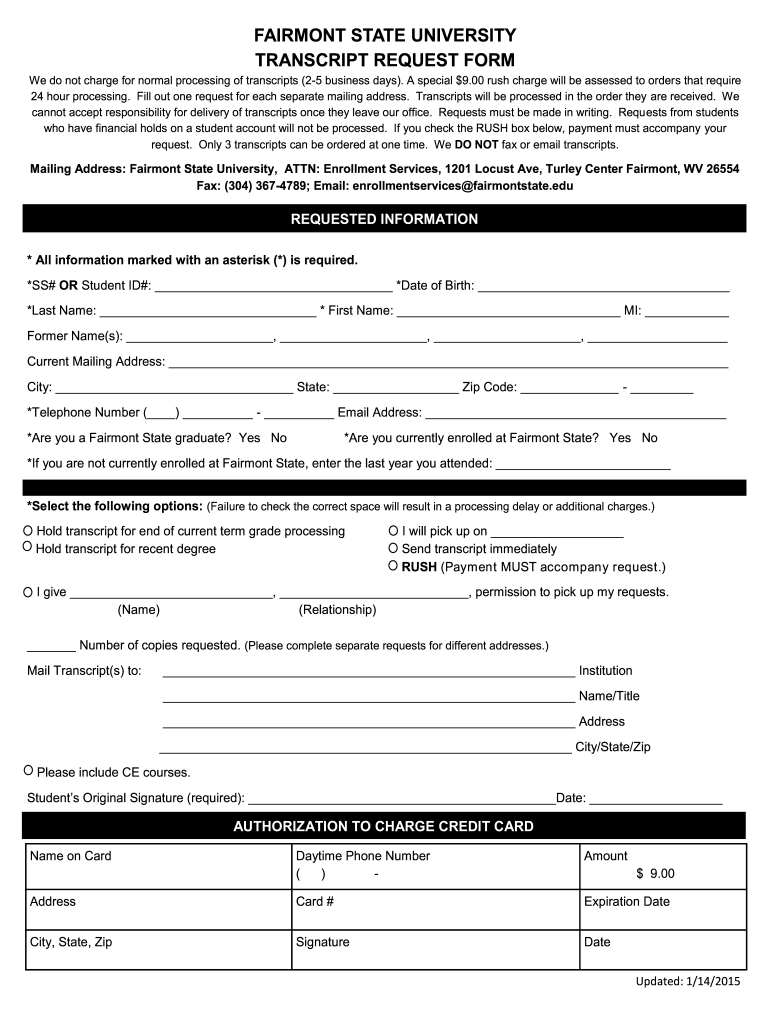
R processing. Fill out one request for each separate mailing address. Transcripts will be processed in the order they are received. We cannot accept responsibility for delivery of transcripts once they leave our office. Requests must be made in writing. Requests from students who have financial holds on a student account will not be processed. If you check the RUSH box below, payment must accompany your request. Only 3 transcripts can be ordered at one time. We DO NOT fax or email transcripts. .
Loading

Open form follow the instructions

Easily sign the form with your finger

Send filled & signed form or save
How to fill out the Fairmont State University Transcript Request Form online
Filling out the Fairmont State University Transcript Request Form online is a straightforward process that allows you to request your transcripts efficiently. This guide provides clear, step-by-step instructions to ensure a smooth and successful submission.
Follow the steps to complete your transcript request form.
- Click ‘Get Form’ button to obtain the form and open it in your document editor.
- Enter your Social Security Number or Student ID in the designated field. This information is crucial for processing your request.
- Fill in your date of birth accurately to verify your identity.
- Provide your last name, first name, and middle initial in the respective fields. If you have had any former names, list them as indicated.
- Complete your current mailing address, including city, state, and zip code. Ensure all details are correct for delivery purposes.
- Input your telephone number and email address, which may be used for further communication regarding your request.
- Indicate whether you are a Fairmont State graduate and if you are currently enrolled. This helps in processing your request accurately.
- If you are not currently enrolled, specify the last year you attended Fairmont State.
- Select the appropriate options regarding how you want your transcript processed, such as holding it for grades or sending it immediately.
- If necessary, indicate if someone else will be picking up your transcripts by providing their name and relationship.
- State the number of copies you are requesting and complete separate requests for different addresses if needed.
- Fill in the mailing address for the transcripts, including the institution name, title, and full address.
- Sign the form to authorize your request and include the date of your signature.
- If requesting a rush processing, ensure that payment is included and fill in the authorization to charge your credit card.
- Once all fields are completed, save any changes made, download the form, and print it if necessary to have a physical copy.
Complete your Fairmont State University Transcript Request Form online today to ensure timely processing of your transcripts.
Experience a faster way to fill out and sign forms on the web. Access the most extensive library of templates available.
Related content
CARE Form · Engage Fairmont State · Library · Request Transcript · FERPA · Title IX...
Transcript Requests. Current and former students can submit a transcript request to the...
General Description: The GfK MRI sample is a strict area probability sample of adults 18...
Get answers to your most pressing questions about US Legal Forms API.
How do I get my degree transcripts?
To obtain your degree transcripts, you will need to submit a request through your college. At Fairmont State University, the Fairmont State University Transcript Request Form allows you to request your academic records with ease. Make sure to provide the necessary information to avoid delays.
How to get a transcript of degree?
To get a transcript of your degree, start by contacting your college’s registrar office or visit their website. For Fairmont State University, using the Fairmont State University Transcript Request Form streamlines this process and ensures you receive the official documentation you need.
How to get a transcript certificate?
To obtain a transcript certificate, you typically need to fill out a request form provided by your college. For Fairmont State University, you would complete the Fairmont State University Transcript Request Form and follow the instructions provided. This request will help you receive your official document promptly.
Can I look up my college transcript online?
Yes, many colleges offer online access to your transcripts. At Fairmont State University, you can use the Fairmont State University Transcript Request Form to securely access and review your academic records. This ensures you have your information at your fingertips when needed.
How long do colleges hold transcripts?
Colleges typically retain transcripts for an extended period, often indefinitely. However, specific retention policies may vary by institution. For Fairmont State University, understanding these policies is essential when using the Fairmont State University Transcript Request Form to obtain your records.
Are transcripts available online?
Yes, you can often request your transcripts online. By using the Fairmont State University Transcript Request Form, you can conveniently access your records without needing to visit the campus. This online process saves time and makes obtaining your transcripts much easier.
How do I ask for transcripts of records?
To ask for transcripts of records, clearly request the specific documents you need from Fairmont State University. Mention that you would like to use the Fairmont State University Transcript Request Form for this purpose. Providing your identification and any necessary information will help facilitate your request effectively.
How do I ask my counselor to send my transcripts?
When asking your counselor to send your transcripts, be clear and direct. Explain that you need your transcripts sent to a specific location and mention that the Fairmont State University Transcript Request Form is ready for use. Providing your counselor with all necessary details will aid in the swift processing of your request.
How do I write a transcript request?
A transcript request should include your personal information, the purpose of the request, and any deadlines that apply. Specify that you are using the Fairmont State University Transcript Request Form, and provide details on where the transcripts should be sent. Including this information helps ensure your request is processed quickly.
What to say when requesting transcripts?
When requesting transcripts, politely state your request, mentioning that you would like to obtain your transcripts from Fairmont State University. Provide pertinent information like your full name and student ID. It is important to express any urgency if you require the transcripts by a specific date.
Use professional pre-built templates to fill in and sign documents online faster. Get access to thousands of forms.
If you believe that this page should be taken down, please follow our DMCA take down process here.