Loading
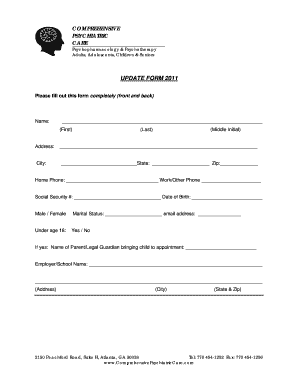
Get Patient Information Update Form
How it works
-

Open form follow the instructions
-

Easily sign the form with your finger
-

Send filled & signed form or save
How to fill out the Patient Information Update Form online
Completing the Patient Information Update Form online is a crucial step in ensuring your healthcare provider has the most accurate and current information about you. This guide provides detailed instructions on how to complete each section of the form effectively and efficiently.
Follow the steps to fill out your Patient Information Update Form easily.
- Press the ‘Get Form’ button to access the Patient Information Update Form and open it in the appropriate online editor.
- Begin with the 'Name' section. Fill in your first name, last name, and middle initial accurately.
- In the 'Address' section, provide your complete current address, including city, state, and zip code.
- Enter your home and work/other phone numbers in the respective fields.
- Input your Social Security number and date of birth. Ensure these are correct for identification purposes.
- Indicate your gender by selecting the appropriate option.
- If you are under age 18, select 'Yes' and provide the name of the parent or legal guardian accompanying you.
- Fill in details about your employer or school, including the name and address.
- Once all fields are completed, review your entries for accuracy.
- Lastly, save your changes, and choose to download, print, or share the completed form as necessary.
Complete your Patient Information Update Form online today to ensure your details are up-to-date.
Insurance information, contact information, current medications, health history, and a checklist of symptoms are all a basic start. It's good to conclude by asking the patient if there's anything else you should know.