Loading
Form preview
  • US Legal Forms
  • Form Library
  • Executive Forms
  • Executive Department Treasury Forms
  • Treasury Fs 1522 2019

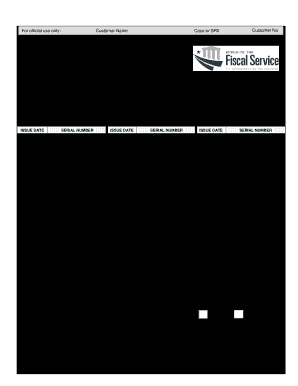
Get Treasury Fs 1522 2019-2026

Ity) (State) (ZIP Code) (Email Address) Sign Here: (Signature) (Print Name) (Social Security Number) Home Address (Number and Street or Rural Route) (Da.

How it works

  1. Open form

    Open form follow the instructions

  2. Easily sign form

    Easily sign the form with your finger

  3. Share form

    Send filled & signed form or save

How to fill out the Treasury FS 1522 online

Filling out the Treasury FS 1522 form online can be straightforward with the right guidance. This form is essential for requesting payment of United States savings bonds and retirement securities, and completing it accurately ensures a smooth transaction.

Follow the steps to fill out the Treasury FS 1522 online.

  1. Press the ‘Get Form’ button to access the Treasury FS 1522 form and open it in your document editor.
  2. In the first section labeled 'Description of Bonds', provide the name(s) of the individual(s) shown on the bonds. Enter the issue dates and serial numbers of the bonds you want to include. If you require more space, you may attach FS Form 3500 or a separate sheet of paper.
  3. In the 'Instructions for Direct Deposit Payment' section, input the payee’s Social Security Number or Employer Identification Number. Then, write the names on the account, specify the banking routing number (9 digits), identify the type of account (checking or savings), and provide the name and phone number of the financial institution.
  4. Proceed to the 'Signature' section. Each individual requesting payment must sign the form in front of a certifying officer, ensuring they also print their name, provide their address, daytime telephone number, and email address if applicable.
  5. Make certain to follow the certification instructions, ensuring that each signatory appears before a certifying officer to validate their identity. The certifying officer will need to complete their section, which includes affixing their signature and official seal.
  6. After filling out all required sections, review the information for accuracy. Save the changes made to the form, and options will be available to download, print, or share it as needed.

Complete your Treasury FS 1522 form online today to ensure your payment request is processed efficiently.

Get form

Experience a faster way to fill out and sign forms on the web. Access the most extensive library of templates available.
Get form

Related content

Special Form of Request for Payment of United...
This form is a special request for payment of US savings and retirement securities, where...
Learn more
31 CFR § 360.24 - Payment pursuant to judicial or...
Fiscal Service Form 1522 must specify: the contact point; the issue date of each bond; the...
Learn more
Annual Financial Statements 2019 Daimler AG
Dec 31, 2019 — The 2019 Daimler AG financial statements include a Balance Sheet, Income...
Learn more

Related links form

TN DoR 55A TN DoR BUS 415 2015 TN DoR BUS 415 2014 TN DoR BUS 415 2009

Questions & Answers

Get answers to your most pressing questions about US Legal Forms API.

Contact support

Avoiding taxes when cashing in savings bonds typically involves understanding the tax laws related to bond redemption, including education exemptions. You could also use the Treasury FS 1522 form if it applies to your situation. For detailed advice on managing your savings bonds and tax implications, USLegalForms can provide tailored assistance.

Retrieving a Treasury bond involves confirming your ownership and having the required documentation, such as the FS 1522 form if necessary. You can then contact the Treasury or your financial institution for the next steps. For additional help, USLegalForms provides resources that simplify this process, making it easier for you.

To obtain a TreasuryDirect tax form, visit the TreasuryDirect website and log into your account. Once logged in, navigate to the appropriate sections to access tax documents, including the Treasury FS 1522 if applicable. If you need further assistance, consider reaching out to customer support or utilizing USLegalForms for guidance.

Completing the Treasury FS 1522 form requires careful attention to its sections. After entering your personal details, proceed to specify the purpose of the request, and sign where indicated. If you're unsure about any section, USLegalForms offers comprehensive guides and templates that can assist you with the form.

To redeem savings bonds held in your TreasuryDirect account, log into your account and go to the 'Redeem' option. Follow the on-screen instructions to select the bonds you want to redeem. The proceeds will typically be deposited directly into your bank account. Refer to your Treasury FS 1522 for guidance if you need assistance during this process.

To convert paper bonds to TreasuryDirect, log in to your TreasuryDirect account and navigate to the conversion section. Enter the required details from your paper bonds. After you complete the process, the value of your bonds will be deposited into your account. Have your Treasury FS 1522 ready to ensure accuracy during the conversion.

If you have lost, had your savings bonds stolen, or if they were destroyed, you can claim them through the TreasuryDirect website. You need to submit a claim using the appropriate forms, such as Form 1048, which allows the U.S. Department of the Treasury to investigate and issue replacements. Keeping your Treasury FS 1522 can streamline this process, as it helps validate your ownership.

To redeem paper savings bonds on TreasuryDirect, you must first convert your paper bonds into electronic form. Log into your TreasuryDirect account and navigate to the 'Manage Direct' section. After filling out the required information, you will submit your request, and your savings bonds will be credited to your account. Make sure you have any necessary documentation, including your Treasury FS 1522.

Using a paper bond is straightforward. First, you need to fill out the required information on the bond, which includes your name and Social Security number. Then, you can redeem the bond at a bank or financial institution that handles them. Always keep your Treasury FS 1522 handy during the process to ensure smooth transactions.

Filling out the FS Form 1522 involves providing accurate information about the bond transaction, including ownership details and any relevant identification numbers. Start by reviewing the instructions carefully to avoid mistakes. If you need assistance, platforms like uslegalforms can provide templates and guidance to streamline the process. Completing the Treasury FS 1522 accurately is key to fulfilling your bond reporting requirements.

Get This Form Now!

Use professional pre-built templates to fill in and sign documents online faster. Get access to thousands of forms.
Get form
If you believe that this page should be taken down, please follow our DMCA take down processhere.

Industry-leading security and compliance

US Legal Forms protects your data by complying with industry-specific security standards.
  • In businnes since 1997
    25+ years providing professional legal documents.
  • Accredited business
    Guarantees that a business meets BBB accreditation standards in the US and Canada.
  • Secured by Braintree
    Validated Level 1 PCI DSS compliant payment gateway that accepts most major credit and debit card brands from across the globe.
Get Treasury FS 1522
Get form
  • Adoption
  • Bankruptcy
  • Contractors
  • Divorce
  • Home Sales
  • Employment
  • Identity Theft
  • Incorporation
  • Landlord Tenant
  • Living Trust
  • Name Change
  • Personal Planning
  • Small Business
  • Wills & Estates
  • Packages A-Z
  • Affidavits
  • Bankruptcy
  • Bill of Sale
  • Corporate - LLC
  • Divorce
  • Employment
  • Identity Theft
  • Internet Technology
  • Landlord Tenant
  • Living Wills
  • Name Change
  • Power of Attorney
  • Real Estate
  • Small Estates
  • Wills
  • All Forms
  • Forms A-Z
  • Form Library
  • Legal Hub
  • About Us
  • Help Portal
  • Legal Resources
  • Blog
  • Affiliates
  • Contact Us
  • Delete My Account
  • Site Map
  • Industries
  • Forms in Spanish
  • Localized Forms
  • State-specific Forms
  • Forms Kit
  • Real Estate Handbook
  • All Guides
  • Notarize
  • Incorporation services
  • For Consumers
  • For Small Business
  • For Attorneys
  • USLegal
  • FormsPass
  • pdfFiller
  • signNow
  • altaFlow
  • DocHub
  • Instapage
Form Packages
  • Adoption
  • Bankruptcy
  • Contractors
  • Divorce
  • Home Sales
  • Employment
  • Identity Theft
  • Incorporation
  • Landlord Tenant
  • Living Trust
  • Name Change
  • Personal Planning
  • Small Business
  • Wills & Estates
  • Packages A-Z
Form Categories
  • Affidavits
  • Bankruptcy
  • Bill of Sale
  • Corporate - LLC
  • Divorce
  • Employment
  • Identity Theft
  • Internet Technology
  • Landlord Tenant
  • Living Wills
  • Name Change
  • Power of Attorney
  • Real Estate
  • Small Estates
  • Wills
  • All Forms
  • Forms A-Z
  • Form Library
Customer Service
  • Legal Hub
  • About Us
  • Help Portal
  • Legal Resources
  • Blog
  • Affiliates
  • Contact Us
  • Delete My Account
  • Site Map
  • Industries
  • Forms in Spanish
  • Localized Forms
  • State-specific Forms
  • Forms Kit
Legal Guides
  • Real Estate Handbook
  • All Guides
Prepared for you
  • Notarize
  • Incorporation services
Our Customers
  • For Consumers
  • For Small Business
  • For Attorneys
Our Sites
  • USLegal
  • FormsPass
  • pdfFiller
  • signNow
  • altaFlow
  • DocHub
  • Instapage
Social Media
Call us now toll free:
+1 833 426 79 33
As seen in:
© Copyright 1999-2026 airSlate Legal Forms, Inc. 3720 Flowood Dr, Flowood, Mississippi 39232
  • Your Privacy Choices
  • Terms of Service
  • Privacy Notice
  • Content Takedown Policy
  • Bug Bounty Program