Loading
Form preview
  • US Legal Forms
  • Other Templates
  • Miscellaneous Forms
  • Multi-State Miscellaneous Forms
  • Osha Hour Card Replacement Form

Get Osha Hour Card Replacement Form

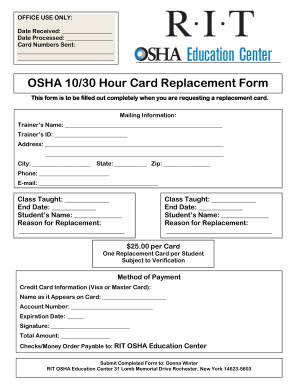
Cement Form This form is to be filled out completely when you are requesting a replacement card. Mailing Information: Trainer’s Name: ______________________________________________________ Trainer’s ID: _________________________ Address: _____________________________________________________________ _____________________________________________________________ City: ____________________ State: ___________ Zip: ________________ Phone: ________________________ E-mail: ________________________.

How it works

  1. Open form

    Open form follow the instructions

  2. Easily sign form

    Easily sign the form with your finger

  3. Share form

    Send filled & signed form or save

How to fill out the OSHA Hour Card Replacement Form online

This guide provides clear and supportive instructions for users looking to complete the OSHA Hour Card Replacement Form online. Follow the outlined steps to ensure a smooth and efficient process.

Follow the steps to fill out the OSHA Hour Card Replacement Form accurately.

  1. Click ‘Get Form’ button to access the OSHA Hour Card Replacement Form and open it in your editing tool.
  2. Begin by entering the trainer’s name in the designated field. This information is crucial for identifying the individual who conducted the training.
  3. Next, input the trainer’s ID number. This identification number helps to verify the trainer’s credentials.
  4. Fill in the mailing address where the replacement card should be sent. Include details such as street address, city, state, and zip code.
  5. Provide a contact phone number and email address for any follow-up communication regarding your replacement card request.
  6. In the 'Class Taught' section, specify the name of the class for which the card is being requested. Also, include the end date of the class.
  7. Enter the student’s name for whom the replacement card is being requested, followed by the reason for the replacement.
  8. If applicable, repeat steps 6 and 7 for any additional classes or students for whom replacement cards are needed.
  9. Fill out the payment information, including credit card details. Make sure to write the name as it appears on the card, account number, expiration date, and provide your signature.
  10. Finally, review all entered information for accuracy. Once confirmed, options may include saving changes, downloading, printing, or sharing the completed form.

Complete your OSHA Hour Card Replacement Form online today!

Get form

Experience a faster way to fill out and sign forms on the web. Access the most extensive library of templates available.
Get form

Related content

How do I get a replacement card?
To obtain a replacement 10-hour or 30-hour card, contact your Outreach trainer. A...
Learn more
OSHA Replacement Card Request Form
Replacement cards will ONLY be mailed to the trainer. Replacement card fee is $15.00 per...
Learn more
M ACHINERY SAFEBOOK 5 - Literature Library
Article 5 also states that each employee shall comply with occupational safety and health...
Learn more

Related links form

UK Hampshire Hospitals Post Vasectomy Request Form Plus Patient Information 2015 UK Handelsbanken Form 1 - Customer Application UK Harneys Compliance Questionnaire - Individuals UK Health and Safety Induction Checklist 2006

Questions & Answers

Get answers to your most pressing questions about US Legal Forms API.

Contact support

To request a replacement OSHA card, you need to complete the OSHA Hour Card Replacement Form, which you can find on various training platforms like US Legal Forms. Ensure you provide accurate information and details of your training course. After submission, your replacement card will be processed and sent to your address. This efficient method guarantees you receive your card in a timely manner.

Yes, you can successfully get your OSHA card online. Numerous approved training providers offer courses that can be completed at your convenience. After completing the required training, you may receive a digital certificate and a physical card. Should you need it, the OSHA Hour Card Replacement Form allows for easy replacement of lost or misplaced cards.

Yes, you can obtain your OSHA card online by enrolling in an accredited OSHA training course. After completing the course, you will receive a digital certification that serves as proof of your training. Additionally, a hard copy of your OSHA card will be mailed to you afterward. If you encounter any issues or misplace your card, you can fill out the OSHA Hour Card Replacement Form for assistance.

While you can often print a temporary certificate after completing your course, the official completion card is usually mailed to you. This card comes with necessary certifications and is recognized for workplace safety compliance. Be sure to provide accurate shipping information during registration to avoid delays. If your card does not arrive, consider utilizing the OSHA Hour Card Replacement Form to request it.

To renew your OSHA card, you typically need to take a refresher course from an approved provider. Some institutions offer online renewal options, allowing you to complete this process conveniently. Once you have finished the course, your new card will be issued. Remember, if you lose your card during this process, the OSHA Hour Card Replacement Form can help you obtain a replacement efficiently.

Yes, online OSHA classes are legitimate if they are offered by accredited providers. These courses meet OSHA's standards and prepare you for safe workplace practices. Ensure you choose a recognized platform, like US Legal Forms, which offers thorough training and meets compliance guidelines. After completing the course, you can request an OSHA Hour Card Replacement Form should you need to replace your card.

You can receive your OSHA 10 card within a few days after successfully completing your training course. Typically, online classes provide immediate access to your digital certification, while physical cards are mailed to you. Ensure your training provider submits your details promptly for a quicker turnaround. If you need the OSHA Hour Card Replacement Form, it can help streamline any processing delays.

Yes, OSHA cards do have an expiration date, depending on the type of training you completed. It's crucial to check the details of your certification to ensure you remain compliant. To make renewal seamless, you can use the OSHA Hour Card Replacement Form to keep your records organized and up-to-date.

Yes, you typically need to recertify for OSHA, especially for certain roles and industries that require up-to-date training. Recertification usually involves taking a refresher course to keep your knowledge current. Leveraging the OSHA Hour Card Replacement Form can assist in tracking your training and recertification dates.

If you've lost your OSHA card, you can request a replacement through your training provider. They will generally require some information about your original training to process the request. Additionally, using the OSHA Hour Card Replacement Form makes the process smoother and ensures you have the necessary documentation for your records.

Get This Form Now!

Use professional pre-built templates to fill in and sign documents online faster. Get access to thousands of forms.
Get form
If you believe that this page should be taken down, please follow our DMCA take down processhere.
Get OSHA Hour Card Replacement Form
Get form
  • Adoption
  • Bankruptcy
  • Contractors
  • Divorce
  • Home Sales
  • Employment
  • Identity Theft
  • Incorporation
  • Landlord Tenant
  • Living Trust
  • Name Change
  • Personal Planning
  • Small Business
  • Wills & Estates
  • Packages A-Z
  • Affidavits
  • Bankruptcy
  • Bill of Sale
  • Corporate - LLC
  • Divorce
  • Employment
  • Identity Theft
  • Internet Technology
  • Landlord Tenant
  • Living Wills
  • Name Change
  • Power of Attorney
  • Real Estate
  • Small Estates
  • Wills
  • All Forms
  • Forms A-Z
  • Other Templates
  • Legal Hub
  • About Us
  • Help Portal
  • Legal Resources
  • Blog
  • Affiliates
  • Contact Us
  • Delete My Account
  • Site Map
  • Industries
  • Forms in Spanish
  • Localized Forms
  • State-specific Forms
  • Forms Kit
  • Real Estate Handbook
  • All Guides
  • Notarize
  • Incorporation services
  • For Consumers
  • For Small Business
  • For Attorneys
  • USLegal
  • FormsPass
  • pdfFiller
  • signNow
  • altaFlow
  • DocHub
  • Instapage
Form Packages
  • Adoption
  • Bankruptcy
  • Contractors
  • Divorce
  • Home Sales
  • Employment
  • Identity Theft
  • Incorporation
  • Landlord Tenant
  • Living Trust
  • Name Change
  • Personal Planning
  • Small Business
  • Wills & Estates
  • Packages A-Z
Form Categories
  • Affidavits
  • Bankruptcy
  • Bill of Sale
  • Corporate - LLC
  • Divorce
  • Employment
  • Identity Theft
  • Internet Technology
  • Landlord Tenant
  • Living Wills
  • Name Change
  • Power of Attorney
  • Real Estate
  • Small Estates
  • Wills
  • All Forms
  • Forms A-Z
  • Other Templates
Customer Service
  • Legal Hub
  • About Us
  • Help Portal
  • Legal Resources
  • Blog
  • Affiliates
  • Contact Us
  • Delete My Account
  • Site Map
  • Industries
  • Forms in Spanish
  • Localized Forms
  • State-specific Forms
  • Forms Kit
Legal Guides
  • Real Estate Handbook
  • All Guides
Prepared for you
  • Notarize
  • Incorporation services
Our Customers
  • For Consumers
  • For Small Business
  • For Attorneys
Our Sites
  • USLegal
  • FormsPass
  • pdfFiller
  • signNow
  • altaFlow
  • DocHub
  • Instapage
Social Media
Call us now toll free:
+1 833 426 79 33
As seen in:
© Copyright 1999-2026 airSlate Legal Forms, Inc. 17 Station Street, Ste. 203, Brookline, MA 02445
  • Your Privacy Choices
  • Terms of Service
  • Privacy Notice
  • Content Takedown Policy
  • Bug Bounty Program