Loading
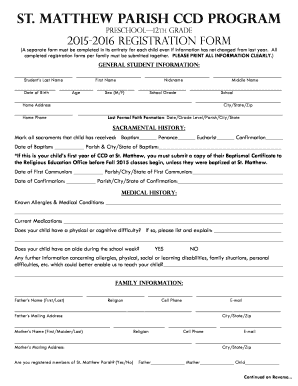
Get Ccd Registration Form 2015-2016.pdf - St. Matthew Catholic Parish - Church Stmatt
How it works
-

Open form follow the instructions
-

Easily sign the form with your finger
-

Send filled & signed form or save
How to fill out the CCD Registration Form 2015-2016.pdf - St. Matthew Catholic Parish - Church Stmatt online
Filling out the CCD Registration Form is an important step in enrolling your child in the CCD program at St. Matthew Catholic Parish. This guide provides step-by-step instructions to assist you in completing the form clearly and correctly.
Follow the steps to successfully complete the CCD Registration Form.
- Click ‘Get Form’ button to obtain the form and open it in the editor.
- Begin by filling out the general student information section. Clearly print the student's last name, first name, nickname, and middle name in the designated fields. Provide the date of birth, age, and sex, along with the school grade and school name.
- Complete the home address details accurately, including the city, state, and zip code. Fill out the home phone number and provide information about the last formal faith formation attended by the child.
- For the sacramental history, mark all applicable sacraments your child has received. Date of baptism, first communion, and confirmation must be filled out with the respective parish and location information.
- Next, move to the medical history section. List any known allergies or medical conditions, current medications, and indicate whether your child has a physical or cognitive difficulty. Include further information that could assist the educators.
- In the family information section, provide the father's and mother's names, religions, contact information, and mailing addresses. Indicate if you are registered members of St. Matthew Parish.
- Read and complete the general permission section for your child's participation in the CCD program. Sign and date this area.
- Complete the medical permission form, providing authorization for first aid and medical treatment in emergencies. Ensure that you sign and date this section as well.
- Fill out the insurance information, including policy holder's name, insurance company details, and contact information for your authorized physician and hospital.
- In the emergency contact section, provide an alternative contact person and their relationship to the child. Ensure to include their phone number.
- Review and agree to the videotaping and photography consent, signing and dating where required.
- Indicate your interest in volunteering, if applicable, by marking the appropriate options and filling in how many children per family are being registered.
- Finally, review the completed form for accuracy. Save your changes, and download, print, or share the form as necessary.
Complete your CCD Registration Form online today!
Industry-leading security and compliance
US Legal Forms protects your data by complying with industry-specific security standards.
-
In businnes since 199725+ years providing professional legal documents.
-
Accredited businessGuarantees that a business meets BBB accreditation standards in the US and Canada.
-
Secured by BraintreeValidated Level 1 PCI DSS compliant payment gateway that accepts most major credit and debit card brands from across the globe.