Loading
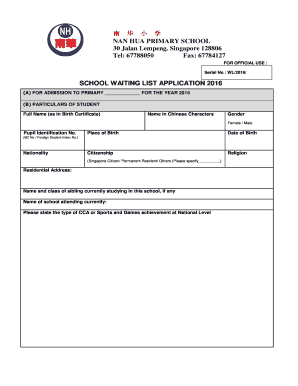
Get Waiting List Application Form 2016 - Nanhua Primary School - Nanhuapri Moe Edu
How it works
-

Open form follow the instructions
-

Easily sign the form with your finger
-

Send filled & signed form or save
How to fill out the Waiting List Application Form 2016 - Nanhua Primary School - Nanhuapri Moe Edu online
Filling out the Waiting List Application Form 2016 for Nanhua Primary School is a crucial step for parents seeking admission for their children. This guide provides an easy-to-follow walkthrough to ensure all required information is accurately submitted online.
Follow the steps to successfully complete your application form.
- Click the ‘Get Form’ button to obtain the form and open it in your preferred digital editing tool.
- Section (A): Indicate the primary level for admission by filling in the blank space provided for the year 2016.
- Section (B) – Particulars of Student: Fill in the student's full name as stated on their birth certificate, name in Chinese characters, gender by selecting either female or male, pupil identification number, place of birth, date of birth, citizenship status, and religion.
- Continue in Section (B) by providing the student's nationality. Choices include Singapore Citizen, Permanent Resident, or Other. Specify if 'Other'.
- Enter the residential address of the student accurately. Provide the name and class of any sibling currently enrolled in the school, as well as the name of the school they currently attend.
- If the student has participated in any Co-Curricular Activities (CCA) or achieved any Sports and Games recognition at the national level, please state those achievements.
- In Section (C) – Particulars of Parents: Fill in the required information for the father and mother, including full names as in NRIC, Chinese characters, NRIC or FIN number, race, nationality, occupation, residential number, mobile number, email address, and highest educational level.
- Provide a brief explanation of the reasons for seeking admission to Nanhua Primary School in the designated area.
- Read the declaration section carefully. Confirm that all information provided is accurate by signing and dating the application.
- Before submitting, gather and submit the required documents such as photocopies of the last two years of examination results and any relevant certificates of achievement.
- Finally, you may submit the completed application form by fax, email, or mail as indicated in the instructions provided.
Complete your application online to secure your child's place on the waiting list!
Serve Humanity with sincerity. Demonstrate Love for all mankind. Show Courtesy at all times. Uphold Righteousness unwaveringly.
Industry-leading security and compliance
US Legal Forms protects your data by complying with industry-specific security standards.
-
In businnes since 199725+ years providing professional legal documents.
-
Accredited businessGuarantees that a business meets BBB accreditation standards in the US and Canada.
-
Secured by BraintreeValidated Level 1 PCI DSS compliant payment gateway that accepts most major credit and debit card brands from across the globe.