Loading
Get Nrc Timesheet - Axis Recruitment
How it works
-

Open form follow the instructions
-

Easily sign the form with your finger
-

Send filled & signed form or save
How to fill out the NRC Timesheet - AXIS Recruitment online
Filling out the NRC Timesheet accurately is essential for timely payment and proper record-keeping. This guide provides a clear and comprehensive walkthrough for users to fill out the form online with confidence.
Follow the steps to successfully complete your timesheet.
- Click ‘Get Form’ button to obtain the NRC Timesheet and open it in your preferred online editor.
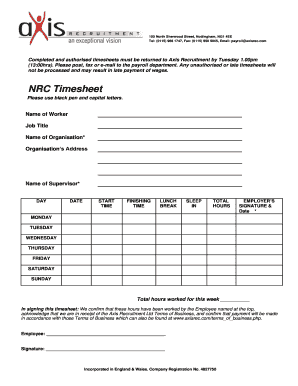
- Fill in the 'Name of Worker' field with the full name of the individual completing the timesheet, using black pen and capital letters.
- In the 'Job Title' field, indicate the job title of the worker.
- Complete the 'Name of Organisation' and 'Organisation’s Address' fields with the relevant details of the organization employing the worker.
- In the 'DAY' section, fill out each day of the week that hours were worked. Be sure to follow the order from Monday to Sunday.
- For each day, enter the 'DATE', 'START TIME', 'FINISHING TIME', 'LUNCH BREAK', 'SLEEP IN', and 'TOTAL HOURS' worked.
- Have the supervisor provide their 'Name' and 'Employer’s Signature & Date' to authorize the timesheet, confirming the hours worked.
- Calculate the 'Total hours worked for this week' and enter that figure in the designated space at the bottom of the form.
- Finally, review the completed timesheet for accuracy, and once satisfied, save the document, then either print, download, or share it with the payroll department.
Ensure timely wage processing by completing and submitting your NRC Timesheet online today.