Loading
Get Malayogam
How it works
-

Open form follow the instructions
-

Easily sign the form with your finger
-

Send filled & signed form or save
How to fill out the Malayogam online
Filling out the Malayogam registration form online can be a straightforward process with the right guidance. This guide will walk you through each section of the form to ensure that you complete it accurately and efficiently.
Follow the steps to successfully complete the Malayogam registration form online.
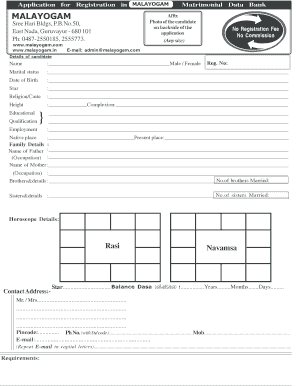
- Click the ‘Get Form’ button to obtain the registration form and access it in your preferred editor.
- Begin by affixing a recent photograph of the candidate on the backside of the application. This photo can be of any size.
- In the 'Details of candidate' section, enter the Registration Number, ensuring that it aligns with your records.
- Fill out the candidate's name, selecting the appropriate designation as Male or Female.
- Indicate your marital status clearly in the corresponding field.
- Enter the candidate's date of birth in the designated space.
- Specify the candidate's star sign based on your astrological information.
- State your religion and caste in the relevant section.
- Provide your height and complexion in the appropriate fields.
- List your educational qualifications, ensuring to include details relevant to the candidate’s background.
- Describe the candidate’s employment situation comprehensively.
- In the 'Native place' section, input the name of the candidate's hometown.
- Indicate the current place of residence of the candidate.
- Fill out the family details, including the names and occupations of both parents.
- Include the number of married brothers and provide details, if applicable.
- Include the number of married sisters and provide any necessary details.
- For horoscope details, enter the Rasi, Navamsa, and star information, along with the balance dasa details.
- Complete the contact address section, indicating whether the individual is Mr. or Mrs.
- Fill in the pincode, telephone number (including STD code), and mobile number.
- Enter the candidate's email address and repeat it in capital letters to ensure accuracy.
- After completing all sections, review the form for accuracy, save your changes, and then choose an option to download, print, or share the completed form.
Start completing your Malayogam registration form online today!
List of Top 10 Leading and Popular Online Matrimonial Sites in India. Shaadi.com. Jeevansathi. Royal Matrimonial. Bharat Matrimony. Matrimonials India. Vivaah.com. Humsafar Matrimony. The Second Shaadi.
Industry-leading security and compliance
US Legal Forms protects your data by complying with industry-specific security standards.
-
In businnes since 199725+ years providing professional legal documents.
-
Accredited businessGuarantees that a business meets BBB accreditation standards in the US and Canada.
-
Secured by BraintreeValidated Level 1 PCI DSS compliant payment gateway that accepts most major credit and debit card brands from across the globe.