Loading
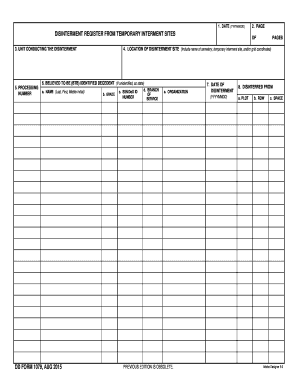
Get Bdd Formb 1079 Disinterment Register From Temporary Interment Bb - Dtic
How it works
-

Open form follow the instructions
-

Easily sign the form with your finger
-

Send filled & signed form or save
How to fill out the BDD Formb 1079 Disinterment Register From Temporary Interment Bb - Dtic online
Filling out the BDD Formb 1079 Disinterment Register From Temporary Interment Bb - Dtic is an important process for documenting disinterment activities. This guide provides clear instructions to help you complete the form accurately and efficiently online.
Follow the steps to fill out the form correctly.
- Click the ‘Get Form’ button to obtain the form and open it in your editing interface.
- In the first section, enter the date in the format YYYYMMDD. This is the date when you are completing the form.
- For 'Unit conducting the disinterment', provide the name of the military unit responsible for the disinterment process.
- Record the processing number, if applicable, in the specified area.
- Next, complete the location of disinterment site field. Include the name of the cemetery, temporary interment site, and/or grid coordinates.
- In the 'Believed to Be (BTB) Identified Decedent' section, fill in the name (last, first, and middle initial) of the identified decedent. If the decedent is unidentified, clearly state this.
- Provide the grade, SSN/DoD ID number, branch of service, and organization for the identified decedent.
- Enter the date of disinterment in the format YYYYMMDD.
- For the disinterred location, specify the plot, row, and space where the decedent was originally interred.
- In the preparing official section, include the name (last, first, middle initial), grade, organization, and signature of the person preparing the form, along with the date signed in the format YYYYMMDD.
- Lastly, if required, the form should be verified by providing the name (last, first, middle initial) of the verifying official.
- Once completed, review all entries for accuracy. Save your changes, download, print, or share the form as needed.
Complete your documents online to streamline the process of disinterment.