Loading
Get Formulaire De Demande De Subvention Incitative Aux Apprentis - Cpqmci
How it works
-

Open form follow the instructions
-

Easily sign the form with your finger
-

Send filled & signed form or save
How to fill out the Formulaire De Demande De Subvention Incitative Aux Apprentis - Cpqmci online
This guide provides clear and reliable instructions for users looking to fill out the Formulaire De Demande De Subvention Incitative Aux Apprentis - Cpqmci online. Whether you are new to digital forms or have some experience, this step-by-step approach will help navigate the process smoothly.
Follow the steps to complete the form successfully.
- Click ‘Get Form’ button to obtain the form.
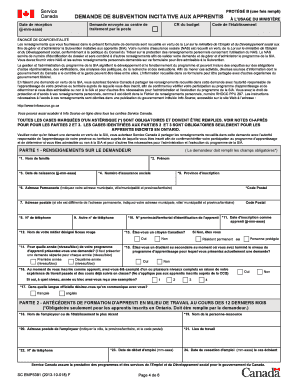
- Begin by entering your personal information in Part 1. This includes your last name, first name, date of birth, social insurance number, and province of registration. Ensure that all fields marked with an asterisk (*) are filled out as they are mandatory.
- Indicate your status by selecting whether you are a Canadian citizen, protected person, or permanent resident. You must also specify whether you were a high school student at the time of completing the level of the apprenticeship program for which you are applying.
- Complete additional sections to provide your apprenticeship training history and technical training information if applicable. These sections are mandatory only for those registered in Ontario.
- Review your direct deposit information in Part 4. While optional, filling this section will allow your grant to be deposited directly into your bank account, if you choose.
- In Part 5, you may provide information regarding employment equity, though this section is also optional.
- Complete the declaration in Part 6 to confirm that all information provided is accurate and true, and sign and date the document.
- Lastly, submit the completed form along with all required supporting documents. Make sure to send the application to the correct Service Canada processing center for your region.
- Once you have submitted your application, keep a copy of the completed form for your records. Monitor any correspondence from Service Canada regarding your application status.
Ready to apply? Complete your Formulaire De Demande De Subvention Incitative Aux Apprentis - Cpqmci online today!
Le numéro se trouve sur la carte vitale de l'assuré si celui-ci a atteint l'âge de 16 ans. Pour les mineurs de moins de 16 ans, le numéro de sécurité sociale figure sur l'attestation de droits disponible depuis le compte Améli du parent auquel est rattaché l'apprenti.
Industry-leading security and compliance
US Legal Forms protects your data by complying with industry-specific security standards.
-
In businnes since 199725+ years providing professional legal documents.
-
Accredited businessGuarantees that a business meets BBB accreditation standards in the US and Canada.
-
Secured by BraintreeValidated Level 1 PCI DSS compliant payment gateway that accepts most major credit and debit card brands from across the globe.