Loading
Get Dr Stuart Nelson
How it works
-

Open form follow the instructions
-

Easily sign the form with your finger
-

Send filled & signed form or save
How to fill out the Dr Stuart Nelson online
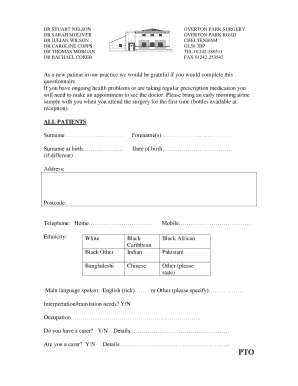
This guide offers users clear and supportive instructions for filling out the Dr Stuart Nelson form. Completing this online document is a straightforward process, designed to gather essential information as you join the practice.
Follow the steps to complete the form easily and efficiently.
- Press the ‘Get Form’ button to access the Dr Stuart Nelson form and open it in your preferred editor.
- Begin by filling in your surname in the designated field, followed by your forename(s) in the next section.
- If your surname at birth differs, please fill that in; otherwise, you may leave it blank.
- Provide your date of birth in the specified format.
- Fill in your current address, ensuring to include the postcode accurately.
- Enter your home and mobile telephone numbers in the appropriate fields.
- Indicate your ethnicity by selecting from the options provided.
- In the next field, specify your main language spoken, marking English if applicable.
- Answer whether you have any interpretation or translation needs.
- Indicate your occupation in the provided section.
- Respond to the questions regarding whether you have a carer or are a carer, providing additional details as necessary.
- Record your current height in centimeters and your weight in kilograms.
- Answer if you have any specific needs related to a disability when visiting the surgery.
- List any known allergies, including medicines, foods, or other substances.
- Answer the smoking status question by selecting one of the options, and provide details if applicable.
- Indicate whether you consume alcohol and specify the amount if you answer 'yes'.
- For children, provide information regarding their school or nursery.
- Identify the main carer for the child, if applicable.
- If you are under 25, indicate whether you would like a chlamydia self-testing kit.
- Confirm your vaccination status for meningitis C and MMR, and schedule appointments as necessary.
- Ensure to witness your ID by providing the receptionist's initials and indicating the types of ID submitted.
- Once all sections are completed, review your information before saving changes, downloading, printing, or sharing the form.
Complete your documents online to ensure a smooth registration process.