Loading
Get Aplikim Per Pune
How it works
-

Open form follow the instructions
-

Easily sign the form with your finger
-

Send filled & signed form or save
How to fill out the Aplikim Per Pune online
This guide provides clear and detailed instructions on how to fill out the Aplikim Per Pune, a job application form. By following these steps, users can ensure that they accurately complete each section of the form to enhance their chances of securing employment.
Follow the steps to fill out the Aplikim Per Pune effectively
- Click ‘Get Form’ button to obtain the form and open it in the editor.
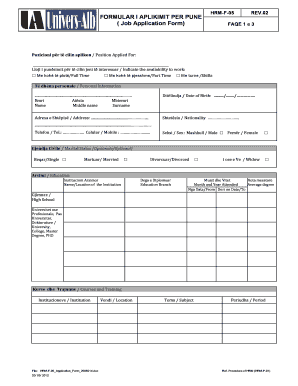
- In the first section, enter the position you are applying for in the designated field, and indicate your availability to work by selecting one of the options for full-time, part-time, or shifts.
- Provide your personal information, including your first name, middle name, surname, date of birth, address, nationality, telephone number, mobile number, sex, and marital status. Fill out each field carefully.
- In the education section, list the educational institutions you attended, including the degree obtained, months and years you attended, and average grade. Start with the most recent education first.
- Complete the courses and training section by detailing any relevant courses you have taken, including the institution, subject, and period of study.
- In the foreign languages section, rate your proficiency in each language from 1 to 5 and indicate the institution where you studied each language.
- For previous employment, start with your most recent job and provide the employer's name, your position, starting and leaving dates, and salary.
- Indicate your proficiency in information technology, including any specific software or systems you are familiar with.
- If applicable, specify whether you have a driving license and the class you possess.
- List any acquaintances or relatives who work at the company, if any, followed by the references section where you provide the names, relationships, and professions of your references.
- Complete the health status section by disclosing any significant illnesses or surgeries, or simply stating 'None' if there are none.
- In the applicant's requests section, indicate your desired gross salary, the date you can start working, and the cities in which you are willing to work or travel for business.
- Review the declaration section, confirm that the information provided is true, and acknowledge your understanding of the data usage policy.
- Finally, choose the date of application and provide your signature before submitting the form.
- Once you have completed the form, you can save your changes, download, print, or share the form as needed.
Start completing your Aplikim Per Pune online now to take the next step in your career.
Industry-leading security and compliance
US Legal Forms protects your data by complying with industry-specific security standards.
-
In businnes since 199725+ years providing professional legal documents.
-
Accredited businessGuarantees that a business meets BBB accreditation standards in the US and Canada.
-
Secured by BraintreeValidated Level 1 PCI DSS compliant payment gateway that accepts most major credit and debit card brands from across the globe.