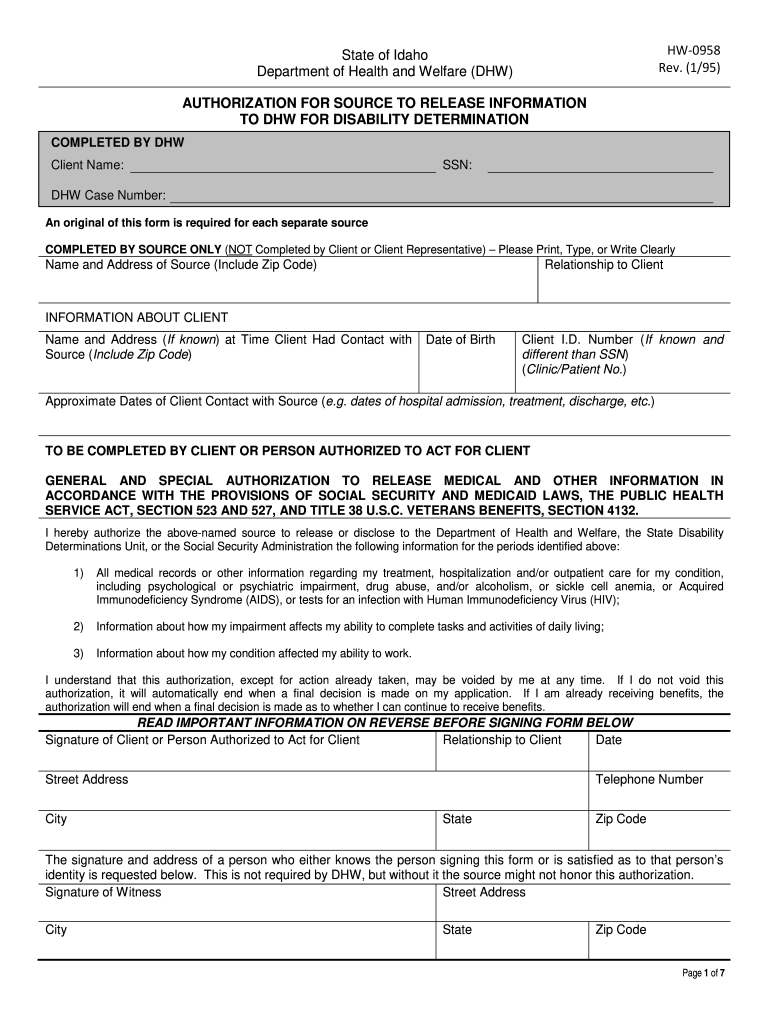
DHW Case Number: An original of this form is required for each separate source COMPLETED BY SOURCE ONLY (NOT Completed by Client or Client Representative) – Please Print, Type, or Write Clearly Name and Address of Source (Include Zip Code) Relationship to Client INFORMATION ABOUT CLIENT Name and Address (If known) at Time Client Had Contact with Source (Include Zip Code) Date of Birth Client I.D. Number (If known and different than SSN) (Clinic/Patient No.) Approximate Dates of Client Co.
Loading

Open form follow the instructions

Easily sign the form with your finger

Send filled & signed form or save
How to fill out the ID HW-0958 online
Filling out the ID HW-0958 form can be a crucial step in accessing necessary resources and support for individuals with disabilities. This guide provides a clear, step-by-step approach for completing the form accurately and efficiently online.
Follow the steps to successfully complete the ID HW-0958 form
- Click the ‘Get Form’ button to obtain the ID HW-0958 form and open it in your chosen online editor.
- Begin by entering the client name at the top of the form. Ensure that all details are printed or typed clearly to avoid confusion.
- Input the client's Social Security Number (SSN) and the DHW Case Number. This information is essential for identification purposes.
- In the section designated for the source of information, provide the name and address of the medical source. Be sure to include the zip code.
- Indicate the relationship of the source to the client; this helps clarify the context of the information being provided.
- Next, fill in the client’s information, including their address at the time of contact with the source, date of birth, and client ID number if available.
- Record the approximate dates of contact between the client and the source, ensuring to specify any relevant treatment dates.
- When you reach the general and special authorization section, read carefully, then authorize the source to release information, specifying what information can be disclosed.
- Provide the signature of the client or an authorized representative, along with their relationship to the client and the date.
- Complete the witness signature line optionally, as this may help legitimize the authorization in certain contexts.
- Review all the entered information for accuracy before finalizing your document. Ensure clarity and correctness.
- Once completed, you can save the changes, download the document, print it for mailing, or share it as needed.
Take the next step and complete your documents online to ensure support is granted without delay.
Experience a faster way to fill out and sign forms on the web. Access the most extensive library of templates available.
Related content
0958 01/01/1900 DENIED. PLEASE RESUBMIT THIS CLAIM WITH THE INSURANCE EOB ... MEMBER ID...
... ID (2006-2013), 4th ID (2013-2017), 198th Infantry BDE (2017-2019), 2nd Cav ... 0958...
You can use the ID link to get information about your product. The ID link is provided as...
Get answers to your most pressing questions about US Legal Forms API.
How to fill out importer identity form?
Filling out an importer identity form involves providing personal or business details that define your identity as an importer. You must accurately include your name, address, and other relevant information to avoid issues with U.S. Customs and Border Protection. Using US Legal Forms can simplify this process, offering you ready-to-use templates that ensure your form for ID HW-0958 is completed correctly and effectively.
How to fill import declaration form?
To fill out an import declaration form, you need to provide specific details about the goods being imported, including description, value, and quantity. Accurate information ensures that customs processes your shipment without delay. For a seamless experience, you might want to use US Legal Forms, where you will find comprehensive templates that guide you step-by-step through the process, especially for ID HW-0958.
Who fills out CBP form 5106?
CBP form 5106 is filled out by importers or their authorized agents when creating or updating their importer identity information. This information is vital for fulfilling U.S. customs requirements. If you need guidance on completing form 5106, you can turn to resources like US Legal Forms, offering clear templates and instructions to help you manage your ID HW-0958.
What is the importer identity form?
The importer identity form is a document that collects essential information about an importer, which helps U.S. Customs and Border Protection verify their identity. This form ensures compliance with trade regulations and streamlines the importing process. To assist with this task, consider using US Legal Forms, which provides templates for the necessary forms, including ID HW-0958.
What is an importer ID?
An importer ID is a unique identifier assigned to businesses or individuals engaging in importing goods into the United States. This ID is crucial for customs, as it helps track and manage import activities efficiently. You can find the specific requirements for obtaining your ID HW-0958 by consulting with the U.S. Customs and Border Protection.
Can a W-7 be filed electronically?
7 form cannot be filed electronically as of now, but you can prepare it easily using our US Legal Forms platform. Simply complete the form online, print it, and then mail it to the appropriate IRS address. By doing so, you ensure a thorough submission linked to your ID HW0958 that meets all IRS requirements.
Can IRS form 720 be filed electronically?
Yes, IRS form 720 can be filed electronically, providing convenience and speed. You can use our US Legal Forms platform to easily access the form and understand the filing process. The online submission is efficient, allowing you to complete your obligations related to ID HW-0958 quickly without the hassle of paper forms.
How to file an identity theft report with the IRS?
If you need to file an identity theft report with the IRS, start by gathering relevant information, including your ID HW-0958, to support your case. The IRS provides specific guidelines on their website for securing your information. Additionally, consider using our US Legal Forms platform to access resources that can streamline your reporting process and ensure a comprehensive submission.
How to file W7 form online?
Filing the W7 form online is straightforward with US Legal Forms. Begin by accessing our online form library and locating the W7 application. Fill out all necessary information accurately, ensuring you include the reference to your ID HW-0958 where applicable. Once completed, submit the form electronically to the IRS for optimal processing.
How to apply for W7 online?
To apply for W7 online, visit our US Legal Forms platform, which guides you through the process effortlessly. First, gather all required documents, such as your identity proof and tax identification number. Next, complete the W7 application form on our website. Lastly, submit your application securely and await your IRS decision regarding your ID HW-0958.
Use professional pre-built templates to fill in and sign documents online faster. Get access to thousands of forms.
If you believe that this page should be taken down, please follow our DMCA take down process here.