TOPIC TIME Total Hours Approved CDPH 278B 06/11 By This form is available on our website at Program Consultant www. Print Form State of California-Health and Human Services Agency California Department of Public Health CDPH Licensing and Certification Program L C Aide and Technician Certification Section ATCS MS 3301 P. O. Box 997416 Sacramento CA 95899-7416 916 327-2445 FAX 916 324-0901 IN-SERVICE TRAINING PROGRAM To be completed by ALL skilled nursing and intermediate care facilities See page two for instructions Facility name and address F Provider identification training number Phone County All Parties Must Sign Required Signatures Administrator Signature Director of Nursing Director of Staff Development Each nursing facility shall provide 24 hours of in-service training annually which shall be accessible to all certified nurse assistants employed by the facility. The content of the in-service training program shall be an enhancement to the basic training program consistent with th....

Open form follow the instructions

Easily sign the form with your finger

Send filled & signed form or save
How to fill out the CA CDPH 278B online
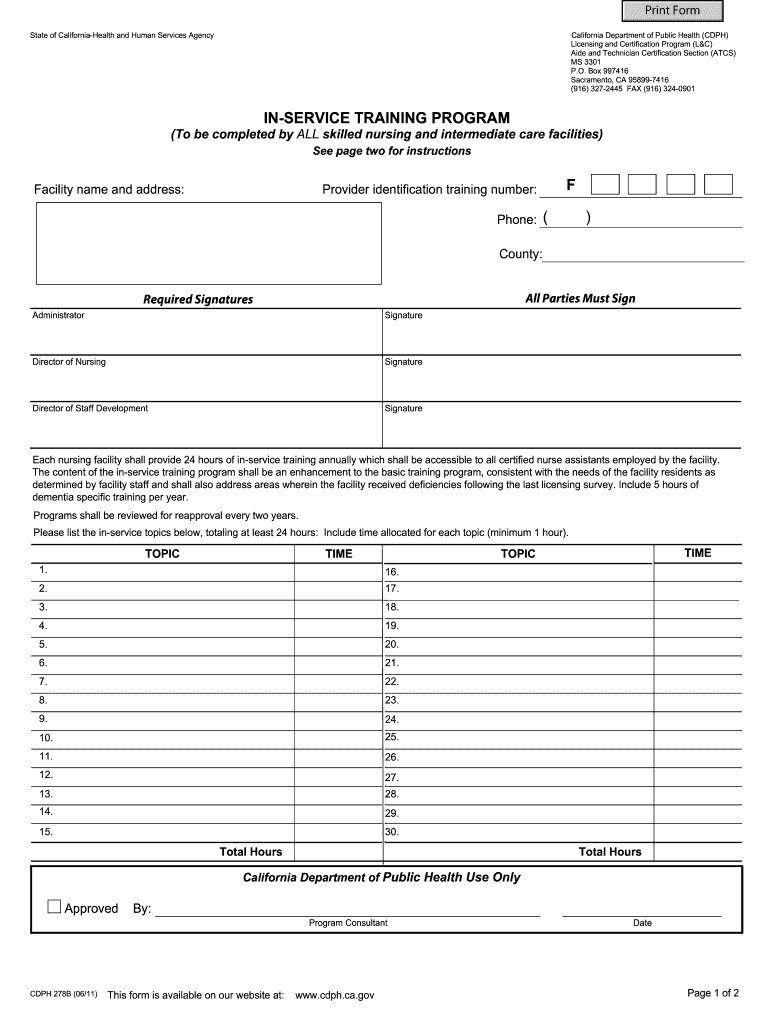
Filling out the CA CDPH 278B form is essential for skilled nursing and intermediate care facilities to ensure compliance with training requirements. This guide provides a clear, step-by-step process to help users complete the form accurately and efficiently.
Follow the steps to fill out the CA CDPH 278B correctly.
- Click 'Get Form' button to obtain the form, allowing you to access it in an online format.
- Begin by entering the facility name and address in the specified fields. Ensure that all details are accurate to avoid processing delays.
- Fill in the provider identification training number and phone number. This information is essential for identification and communication.
- Indicate the county in which the facility is located. This helps in categorizing your submission within the state system.
- In the required signatures section, ensure that the administrator, director of nursing, and director of staff development affix their signatures where indicated. Each signature is a confirmation of the submitted information.
- List the training program topics in the provided sections, ensuring that you total at least 24 hours of in-service training as mandated. Allocate a minimum of one hour per topic.
- Ensure to provide two lesson plans from different topics. Each lesson plan should include student behavioral objectives, descriptive content, teaching methods, and evaluation methods.
- Create and include a proposed three-month schedule calendar for conducting the in-service training programs. This helps in the planning and organization of training efforts.
- Specify how you will include all three shifts in the in-service training. This is necessary to ensure all staff members have access to the required training.
- Before submitting, review the checklist to confirm that all required signatures are included, lesson plans are submitted, and all fields on the form are completed.
- Once confirmed, download or print the completed form as necessary. Be sure to keep copies for your records, as original signatures are required for submission.
Complete your CA CDPH 278B form online today to ensure compliance and improve training programs.
Experience a faster way to fill out and sign forms on the web. Access the most extensive library of templates available.
Related content
CDPH 278B (12/19). This form is available on our website at: California Department of...
Jan 1, 2025 — Foundational Knowledge. Volume I: Hospitals. Volume II:...
May 1, 2019 — THE SHIPPERS LISTED HAVE BEEN CERTIFIED BY REGULATORY AUTHORITIES IN THE...
Get answers to your most pressing questions about US Legal Forms API.
What is the phone number for a CDPH complaint?
If you prefer to speak directly with someone about your complaint, you can contact the CDPH at their dedicated complaint hotline. This number is typically listed on their official website. For issues related to the CA CDPH 278B, a representative can guide you through the complaint process and answer any questions you may have.
Is the form 283B or CDPH 932 form?
When dealing with certain complaints related to healthcare, you might encounter both forms, but it’s vital to check which applies to your situation. Generally, the CDPH 932 form is used for specific incidents, whereas form 283B might be for broader matters. Referencing the CA CDPH 278B can help clarify which form is right for your needs.
What is the best way to file a complaint?
The best way to file a complaint depends on the specific agency and your situation. Generally, online submissions are quicker and allow for immediate tracking of your complaint. By incorporating the details from the CA CDPH 278B, you can ensure that your complaint is well-structured and relevant, increasing the likelihood of a timely response.
How do I file a complaint with the FEC?
Filing a complaint with the Federal Election Commission (FEC) involves submitting a written statement detailing the alleged violation. You can mail your complaint or use the FEC's online submission tool for more convenience. It’s advisable to follow the guidelines outlined in the CA CDPH 278B document when preparing your complaint for a smoother process.
How do I file a complaint with ca AG?
To file a complaint with the California Attorney General's office, you can visit their website and complete the online complaint form. It's essential to provide comprehensive information regarding your issue to facilitate the investigation. If you're unsure about the process, the CA CDPH 278B guidelines can also offer some helpful insights.
How to file a complaint with CDPH?
Filing a complaint with the California Department of Public Health (CDPH) is straightforward. You can submit your complaint by mail or through an online form specifically designed for this purpose. Make sure to reference CA CDPH 278B in your complaint for clarity and include all necessary details to expedite the review process.
What are the requirements to be a CNA instructor in California?
To become a CNA instructor in California, one must meet specific educational and practical experience requirements as outlined by the CA CDPH 278B. Typically, you need to hold a current RN license, complete an approved teacher training program, and have at least two years of nursing experience. Furthermore, you must pass a competency assessment to ensure you meet teaching standards.
What is 283b?
The 283B designation directly refers to forms concerning patient care certifications in California. It is critical for professionals in the healthcare sector to understand the implications of this form. Pairing this knowledge with the CA CDPH 278B insights will set a strong foundation for your career in healthcare, ensuring compliance and eligibility for job opportunities.
How much does a certified nursing assistant make in California?
In California, certified nursing assistants (CNAs) typically earn between $30,000 to $40,000 annually. Wage levels can vary based on experience, location, and healthcare facility. For those aspiring to be a CNA, completing the CA CDPH 278B certification can enhance your employability and potentially lead to higher earnings.
What is the CDPH 932 form?
The CDPH 932 form pertains to specific reporting requirements for California's healthcare system. This form focuses on compliance with state health regulations. Understanding the CA CDPH 278B can give you insights into the necessary steps for certifications that directly affect your healthcare career.
Use professional pre-built templates to fill in and sign documents online faster. Get access to thousands of forms.
If you believe that this page should be taken down, please follow our DMCA take down process here.