Loading
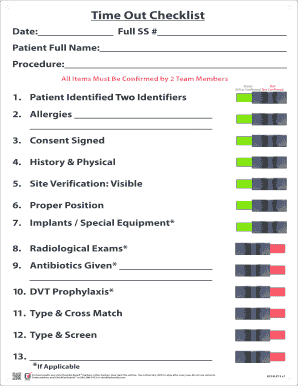
Get Va Tampa Timeout - Checklist Boards
How it works
-

Open form follow the instructions
-

Easily sign the form with your finger
-

Send filled & signed form or save
How to fill out the VA Tampa Timeout - Checklist Boards online
Filling out the VA Tampa Timeout - Checklist Boards form is a critical step in ensuring patient safety and procedural accuracy. This guide provides a clear, step-by-step approach to help you complete the form accurately and efficiently.
Follow the steps to successfully complete the VA Tampa Timeout - Checklist Boards form.
- Click ‘Get Form’ button to obtain the form and open it for editing.
- Begin by entering the date in the designated field. Ensure the date is current to maintain accurate procedural records.
- Provide the full social security number in the appropriate area. This information is crucial for identification purposes.
- Fill in the patient's full name carefully in the specified section. Verify the spelling before proceeding.
- Indicate the procedure being performed by writing it in the dedicated field. This helps in identifying the context of the checklist.
- Confirm the patient's identifiers by checking two options from the list provided: Green, Red, or N/A/Confirmed/Not Confirmed. Two team members must validate this entry.
- List any allergies the patient has in the provided space to ensure proper care during the procedure.
- Confirm whether the consent has been signed by marking the corresponding box.
- Provide the history and physical details as required. This section should summarize critical patient information.
- Perform site verification by ensuring the site is clearly visible and mark it accordingly.
- Ensure the proper positioning of the patient is recorded in the form. This is essential for procedural safety.
- Record any implants or special equipment that are applicable for the procedure.
- List and confirm any radiological exams that were conducted before the procedure.
- Note whether antibiotics have been administered and provide details, if applicable.
- Confirm whether DVT prophylaxis has been provided for the patient.
- Complete the typing and crossmatching details, making sure all required information is entered.
- Provide details for typing and screening following the same careful verification process.
- Once all fields are completed and verified, save your changes, and download, print, or share the completed form as needed.
Complete your documents online to enhance efficiency and accuracy.