Loading
Get Calvary Pediatrics
How it works
-

Open form follow the instructions
-

Easily sign the form with your finger
-

Send filled & signed form or save
How to fill out the Calvary Pediatrics online
Filling out the Calvary Pediatrics form is an important step in ensuring your child receives the necessary medical care. This guide will provide you with clear and detailed instructions on how to complete the form thoroughly and accurately.
Follow the steps to complete the Calvary Pediatrics form effectively.
- Click the ‘Get Form’ button to access the form and open it in your preferred online editor.
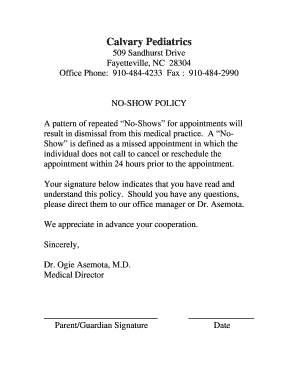
- Begin by filling in the parent or guardian's name at the top of the form. Ensure that the information is current and accurate to avoid any issues with communication.
- Next, provide the date of signing the form. This date ensures that the policy acknowledgment is timely.
- Read the no-show policy carefully. It is crucial to understand the implications of repeated no-shows and the importance of canceling or rescheduling with at least 24 hours' notice.
- Once you have read the policy, indicate your understanding by signing the form in the designated signature line. This signature confirms that you have reviewed the no-show policy.
- After signing, review the entire form for any errors and ensure all details are complete before proceeding.
- Finally, you can save the changes you made, download the completed form, print it for your records, or share it as needed.
Complete the Calvary Pediatrics form online today to ensure your child’s healthcare needs are met promptly.
Graduation from an approved medical school and specific specialty training are required. Completion of the certifying examinations of the Royal College of Physicians and Surgeons of Canada and licensing by the provincial or territorial licensing authority are required.