Address pre-printed on the front of the form. LEGAL BASIS FOR REPORTING REQUIREMENTS Title 38, United States Code, Section 4212(d) requires that federal contractors report at least annually the numbers of employees in the workforce by job category and hiring location, and the number of such employees, by job category and hiring location, who are qualified covered veterans. Federal contractors must report the total number of new hires during the period covered by the report and the number of such.
Loading

Open form follow the instructions

Easily sign the form with your finger

Send filled & signed form or save
How to fill out the DoL VETS-100A online
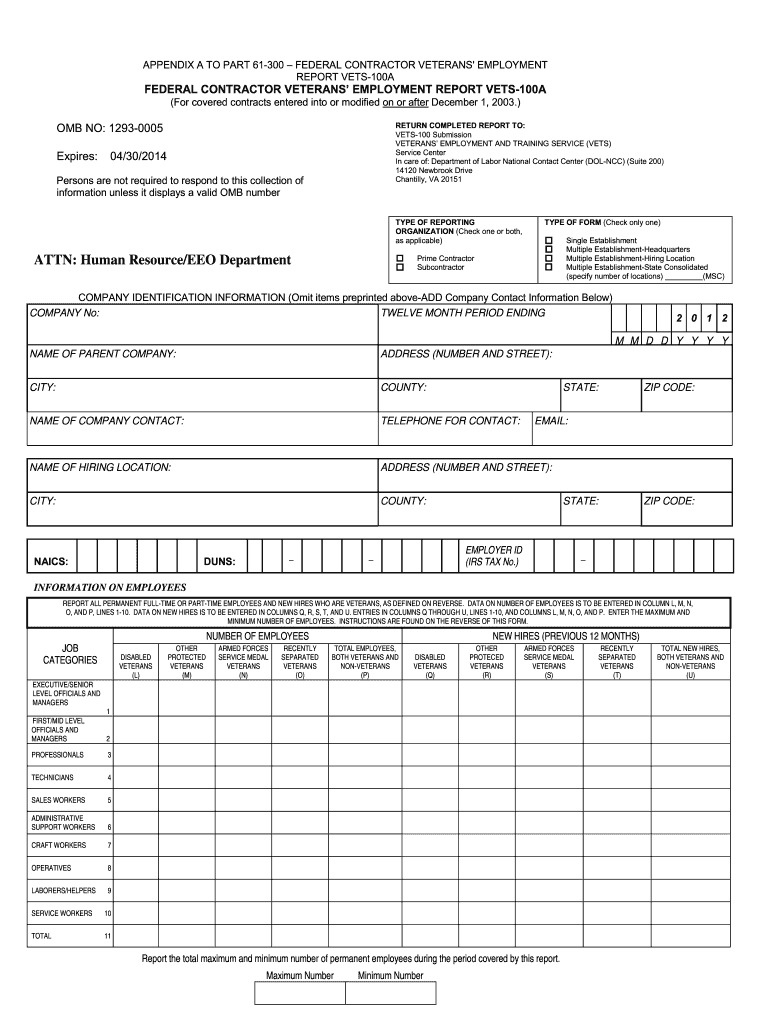
The DoL VETS-100A form is essential for federal contractors and subcontractors to report on veterans' employment statistics. This guide offers a straightforward approach to completing the form online, ensuring that all necessary information is accurately submitted.
Follow the steps to effectively complete the VETS-100A form.
- Use the ‘Get Form’ button to access the VETS-100A form and open it in your preferred editor.
- Indicate your organization’s reporting type by checking either 'Prime Contractor' or 'Subcontractor', or both if applicable.
- Select the type of reporting form. Choose between 'Single Establishment' and 'Multiple Establishment', making sure to check the appropriate category.
- Provide your company's identification information. Leave any preprinted sections blank and fill in the company name, address, city, county, and contact details.
- Complete the NAICS code, DUNS number, and Employer ID (IRS Tax Number) sections as required. If applicable, check with your company records for the correct entries.
- Report employee statistics by entering the required data for both full-time and part-time employees who are veterans in the appropriate columns and rows.
- Document the total maximum and minimum number of employees for the reporting period. Make sure to include all relevant veterans under specified categories.
- Carefully review all entered information for accuracy, ensuring that each field is completed to avoid issues.
- Once everything is filled out, save the changes, download, print, or share the completed VETS-100A form as necessary.
Complete your VETS-100A form online to ensure compliance with federal reporting requirements.
Experience a faster way to fill out and sign forms on the web. Access the most extensive library of templates available.
Related content
The final rule revises the VETS-100A Report and renames it the VETS-4212 Report. The...
OFCCP Reporting: VETS: What is the difference be- tween the VETS 100 and VETS 100A report...
A subset of the ISP notation is used in this manual to describe hardware functions. This...
Get answers to your most pressing questions about US Legal Forms API.
What are the veteran categories for section 4212?
Section 4212 categorizes veterans into various groups, including disabled veterans, recently separated veterans, and other protected veterans. These categories ensure that specific protections and resources are available to distinct groups based on their service backgrounds. By understanding these classifications, veterans can better utilize the tools related to DoL VETS-100A.
What are the benefits of protected veteran status?
Protected veteran status comes with various benefits, including legal protections against discrimination during hiring and employment practices. It also opens doors to additional support programs specifically aimed at enhancing employment opportunities. Leveraging knowledge about DoL VETS-100A can help veterans access these benefits effectively.
What is the difference between a protected veteran and a regular veteran?
A protected veteran is someone who is entitled to specific employment protections under the law, while a regular veteran does not necessarily have those same legal standing in employment matters. This distinction is crucial in understanding the benefits available through resources outlined in the DoL VETS-100A. Knowing your status helps you advocate for your rights.
What is identifying as a protected veteran?
Identifying as a protected veteran means recognizing one’s veteran status and understanding the legal rights that come with it. This includes protections against discrimination in the workplace. Being aware of what the DoL VETS-100A entails can empower veterans in their job searches.
What is the difference between vets 100 and vets-4212?
The primary difference between vets-100 and vets-4212 lies in their focus and requirements; the vets-100 form was more about employee statistics, while the vets-4212 aims to provide a comprehensive view of veteran employment in companies. Both are essential, but understanding the updates in the vets-4212 can make compliance with DoL VETS-100A easier for employers.
Can you work if you are a 100% disabled veteran?
Yes, a 100% disabled veteran can work and often benefits from programs designed to assist in the transition back to work. The law does not prevent employment, and many resources are available to support these veterans. Engaging with platforms aware of DoL VETS-100A can guide them toward suitable job opportunities.
What is the purpose of vets-4212?
The purpose of the vets-4212 is to ensure that employers actively track their hiring of veterans. This report promotes accountability in veteran employment practices. By submitting the vets-4212, organizations align with the principles highlighted in the DoL VETS-100A, ensuring veteran rights are upheld.
Can you be fired as a protected veteran?
While a protected veteran can be terminated, legal protections exist against discriminatory practices. Employers are required to demonstrate non-bias in their employment practices as outlined by regulations such as the DoL VETS-100A. It's crucial for veterans to be aware of these protections.
What is DOL vets?
DOL VETS refers to the Department of Labor's Veterans' Employment and Training Service. This agency is dedicated to ensuring that veterans receive the assistance they need to secure good jobs. Understanding DOL VETS-100A connects you with resources that can facilitate your employment as a veteran.
Did vets-4212 replace vets 100?
Yes, the vets-4212 has taken the place of the former VETS-100 form. This update reflects the government’s commitment to improve the reporting process for employment of veterans. It aligns with the principles established in the DoL VETS-100A, focusing on providing better support for veterans in the workforce.
Use professional pre-built templates to fill in and sign documents online faster. Get access to thousands of forms.
If you believe that this page should be taken down, please follow our DMCA take down process here.