Loading
Get Eikenhof Manor
How it works
-

Open form follow the instructions
-

Easily sign the form with your finger
-

Send filled & signed form or save
How to fill out the Eikenhof Manor online
Filling out the Eikenhof Manor application form online can be a straightforward process with the right guidance. This guide will help you navigate each section of the form efficiently, ensuring you provide all necessary information accurately.
Follow the steps to complete the Eikenhof Manor application form online.
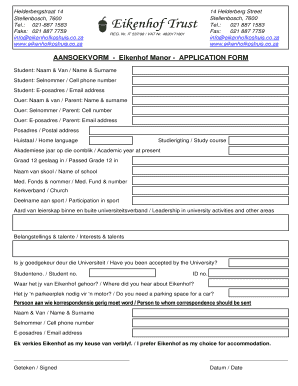
- Click the ‘Get Form’ button to access the Eikenhof Manor application form and open it in your chosen editing tool.
- Begin by entering the student's full name in the designated field labeled 'Student: Naam & Van'. Make sure to provide both first and last names.
- Next, fill in the student's cell phone number under 'Student: Selnommer'. It should include the area code.
- Provide the student's email address in the 'E-posadres' field, ensuring it is entered correctly for effective communication.
- Next, move to the parent's details. Enter the parent’s full name under 'Ouer: Naam & van'.
- Fill in the parent's cell phone number under 'Ouer: Selnommer'.
- Provide the parent’s email address in the 'E-posadres' section.
- Enter the postal address in the 'Posadres' section; this should be the current mailing address.
- Indicate the home language by selecting from the provided options in the 'Huistaal' field.
- Specify the intended course of study under 'Studierigting'.
- State the current academic year in 'Akademiese jaar op die oomblik'.
- Indicate the year in which the student passed Grade 12 in 'Graad 12 geslaag in'.
- Provide the name of the school attended under 'Naam van skool'.
- If applicable, fill in the medical fund and number in 'Med. Fonds & nommer'.
- Specify the church association in the 'Kerkverband' field.
- Indicate participation in sports by checking the appropriate section under 'Deelname aan sport'.
- Detail any leadership roles inside or outside of university in 'Aard van leierskap binne en buite universiteitsverband'.
- List any interests and talents in the designated 'Belangstellings & talente' field.
- Answer whether the student has been accepted by the university in the 'Is jy goedgekeur deur die Universiteit' section.
- If applicable, enter the student number in 'Studenteno'.
- Provide the ID number in 'ID no.' to ensure identification.
- Indicate how you heard about Eikenhof in 'Waar het jy van Eikenhof gehoor?'.
- If necessary, indicate whether a parking space is needed in 'Het jy 'n parkeerplek nodig vir 'n motor?'.
- Fill in the person to whom correspondence should be addressed, including their full name, cell number, and email address.
- Finally, confirm your preference for Eikenhof as your choice of accommodation by completing the relevant section.
- Sign and date the form in the provided fields marked 'Geteken' and 'Datum'.
- Once you have filled out all sections, review the form for accuracy. You can then save changes, download the completed form, print it, or share it as needed.
Complete your application for Eikenhof Manor online today!
Industry-leading security and compliance
US Legal Forms protects your data by complying with industry-specific security standards.
-
In businnes since 199725+ years providing professional legal documents.
-
Accredited businessGuarantees that a business meets BBB accreditation standards in the US and Canada.
-
Secured by BraintreeValidated Level 1 PCI DSS compliant payment gateway that accepts most major credit and debit card brands from across the globe.