Loading
Form preview
  • US Legal Forms
  • Form Library
  • Executive Forms
  • Executive Department DOD Forms
  • Da 5988-e & Da 5987-e

Get Da 5988-e & Da 5987-e

EXPECTED DATE/TIME OF RETURN: EQUIP DISPATCHER’S SIGNATURE: 1ST OPERATOR’S SIGNATURE: 2ND OPERATOR’S SIGNATURE: OFF POST AUTHORIZATION: DISPATCH OUT REMARKS: END ITEM USAGE DATA EQUIPMENT NOUN M/H/K CURRENT READING READING AT RETURN FUEL USAGE (IN GALLONS) COMPONENT (S) USAGE DATA COMPONENT SERIAL NUMBER NOUN M/H/K CURRENT READING 10 READING AT RETURN FUEL USAGE (IN GALLONS) .

How it works

  1. Open form

    Open form follow the instructions

  2. Easily sign form

    Easily sign the form with your finger

  3. Share form

    Send filled & signed form or save

How to fill out the DA 5988-E & DA 5987-E online

This guide provides comprehensive instructions on how to fill out the DA 5988-E and DA 5987-E forms online. Each section and field will be clearly explained to ensure users can complete these documents efficiently.

Follow the steps to fill out the forms accurately and efficiently.

  1. Click ‘Get Form’ button to obtain the form and open it in the editor.
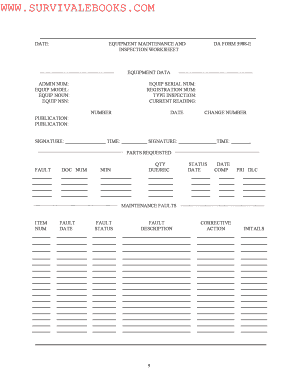
  2. Begin by entering the equipment data in the respective fields. This includes the admin number, equipment model, equipment noun, equipment NSN, and serial number.
  3. Fill in the registration number and type of inspection. Then, record the current reading along with the date and change number.
  4. In the parts requested section, provide details such as the fault description, document number, NIIN, quantity, due/received status, and dates as applicable.
  5. For maintenance faults, list each item along with the fault date, status, fault description, corrective action, and initials.
  6. When filling out the DA 5987-E form, enter the UIC, date dispatched, and time dispatched. Complete all fields related to equipment data, including serial number, registration number, and equipment license number.
  7. Complete the service due data section by indicating the type and due dates for PMCS, oil analysis, lubrication, and special services.
  8. For the dispatch information, include the official user’s name and phone number, destination, expected date/time of return, and the signatures of the dispatcher and operators.
  9. Fill in end item usage data, specifying the equipment noun, current reading, reading at return, and fuel usage in gallons.
  10. Complete the components usage data section by detailing the component serial number, noun, current reading, reading at return, and fuel usage. Finally, review all entries for accuracy.
  11. After filling out all sections, save your changes, download the form, print it for records, or share as necessary.

Complete the DA 5988-E & DA 5987-E forms online to ensure proper equipment maintenance and inspection.

Get form

Experience a faster way to fill out and sign forms on the web. Access the most extensive library of templates available.
Get form

Related content

Da Form 5988-e Pdf
The da form 5988-e is a standardized document used across the Army to document maintenance...
Learn more
IAUC 5988: 1994O; 1994j; P/SCHWASSMANN ...
IAUC 5988: 1994O; 1994j; P/SCHWASSMANN-WACHMANN 1. The following ... Read IAUC 5987 SEARCH...
Learn more
STP 55-88M14-SM-TG Soldier's Manual and Trainer's...
Dec 23, 1993 — If no deficiencies are noted, put initials in column e of DA Form 2404/DA...
Learn more

Related links form

USDA RD 4288-1 2011 USDA RD 440-34 2005 USDA RD 440-34 2000 USDA RD 442-21 1995

Questions & Answers

Get answers to your most pressing questions about US Legal Forms API.

Contact support

The DA form 5984-E is primarily used for the serviceability of equipment as part of the Army's maintenance operations. It tracks service history and helps determine whether equipment meets operational standards. While the DA 5988-E focuses on pending maintenance, the 5984-E assures that the equipment is safe and ready for use. Both forms work together to maintain equipment readiness.

To print out the DA 5988-E form in the GCSS Army system, first log into your account. Navigate to the equipment section and locate the specific asset you wish to print. Select the DA 5988-E associated with that equipment, then choose the print option from the menu. Make sure your printer is set up correctly to ensure a smooth process.

To print DA Form 5988-E from G Army, start by accessing the system and navigating to the maintenance module. Locate your specific equipment record, and select the option to generate the report. Follow the prompts to print the form directly from your device, ensuring you have the correct printer settings for optimal results.

The DA Form 2404 is utilized for inspecting and documenting the condition of military equipment. This form guides users through the inspection process, ensuring all necessary checks are completed and recorded. It is essential for tracking the readiness and operational status of military assets. Using this form effectively contributes to maintaining safety and functionality.

The DA Form 5988-E and DA Form 2404 both serve important functions in equipment maintenance, yet they differ significantly. The 5988-E records detailed maintenance actions and is often used for tracking and reporting. In contrast, the DA Form 2404 is specifically focused on conducting and documenting equipment inspections. Understanding these distinctions helps users select the appropriate form for their needs.

The DA Form 5988-E is primarily used for equipment maintenance management. This form enables military personnel to track the operational status and maintenance needs of their equipment effectively. By documenting these details, users ensure readiness and efficient resource management. It plays a crucial role in prioritizing repairs and maintenance tasks.

The DA Form 5988-E is utilized for documenting individual pieces of equipment, including their maintenance status and any experienced issues. This form serves as a crucial tool for logistical oversight, ensuring that commanders are informed about their equipment's readiness levels. By effectively using the DA 5988-E and the DA 5987-E together, units can maintain good equipment management practices.

The term '5988' generally refers to the DA Form 5988-E, a maintenance and readiness document that aids in tracking military equipment's operational status. This form facilitates communication about maintenance needs, upcoming services, and overall equipment conditions. By ensuring accurate data entry, personnel can rely on this form to enhance their unit's efficiency.

The primary difference between DA Form 2404 and DA Form 5988-E lies in their specific functions; 2404 is more for reporting faults during equipment checks, while 5988-E provides a broader overview of equipment status and maintenance history. The DA 5988-E offers a comprehensive documentation approach to equipment management, essential for ensuring operational readiness. For units looking to navigate these forms efficiently, USLegalForms can offer the necessary tools.

DA Form 5988-E is an essential document used in the Army for tracking equipment readiness, maintenance history, and necessary repairs. It serves as a summary of the unit's equipment status, providing vital data to maintain operational efficiency. Utilizing the DA 5988-E together with the DA 5987-E enhances transparency and accuracy in equipment management.

Get This Form Now!

Use professional pre-built templates to fill in and sign documents online faster. Get access to thousands of forms.
Get form
If you believe that this page should be taken down, please follow our DMCA take down processhere.

Industry-leading security and compliance

US Legal Forms protects your data by complying with industry-specific security standards.
  • In businnes since 1997
    25+ years providing professional legal documents.
  • Accredited business
    Guarantees that a business meets BBB accreditation standards in the US and Canada.
  • Secured by Braintree
    Validated Level 1 PCI DSS compliant payment gateway that accepts most major credit and debit card brands from across the globe.
Get DA 5988-E & DA 5987-E
Get form
Form Packages
Adoption
Bankruptcy
Contractors
Divorce
Home Sales
Employment
Identity Theft
Incorporation
Landlord Tenant
Living Trust
Name Change
Personal Planning
Small Business
Wills & Estates
Packages A-Z
Form Categories
Affidavits
Bankruptcy
Bill of Sale
Corporate - LLC
Divorce
Employment
Identity Theft
Internet Technology
Landlord Tenant
Living Wills
Name Change
Power of Attorney
Real Estate
Small Estates
Wills
All Forms
Forms A-Z
Form Library
Customer Service
Your Privacy Choices
Terms of Service
Privacy Notice
Legal Hub
Content Takedown Policy
Bug Bounty Program
About Us
Help Portal
Legal Resources
Blog
Affiliates
Contact Us
Delete My Account
Site Map
Industries
Forms in Spanish
Localized Forms
State-specific Forms
Forms Kit
Legal Guides
Real Estate Handbook
All Guides
Prepared for You
Notarize
Incorporation services
Our Customers
For Consumers
For Small Business
For Attorneys
Our Sites
US Legal Forms
USLegal
FormsPass
pdfFiller
signNow
altaFlow
DocHub
Instapage
Social Media
Call us now toll free:
+1 833 426 79 33
As seen in:
  • USA Today logo picture
  • CBC News logo picture
  • LA Times logo picture
  • The Washington Post logo picture
  • AP logo picture
  • Forbes logo picture
© Copyright 1997-2025
airSlate Legal Forms, Inc.
3720 Flowood Dr, Flowood, Mississippi 39232
Form Packages
Adoption
Bankruptcy
Contractors
Divorce
Home Sales
Employment
Identity Theft
Incorporation
Landlord Tenant
Living Trust
Name Change
Personal Planning
Small Business
Wills & Estates
Packages A-Z
Form Categories
Affidavits
Bankruptcy
Bill of Sale
Corporate - LLC
Divorce
Employment
Identity Theft
Internet Technology
Landlord Tenant
Living Wills
Name Change
Power of Attorney
Real Estate
Small Estates
Wills
All Forms
Forms A-Z
Form Library
Customer Service
Your Privacy Choices
Terms of Service
Privacy Notice
Legal Hub
Content Takedown Policy
Bug Bounty Program
About Us
Help Portal
Legal Resources
Blog
Affiliates
Contact Us
Delete My Account
Site Map
Industries
Forms in Spanish
Localized Forms
State-specific Forms
Forms Kit
Legal Guides
Real Estate Handbook
All Guides
Prepared for You
Notarize
Incorporation services
Our Customers
For Consumers
For Small Business
For Attorneys
Our Sites
US Legal Forms
USLegal
FormsPass
pdfFiller
signNow
altaFlow
DocHub
Instapage
Social Media
Call us now toll free:
+1 833 426 79 33
As seen in:
  • USA Today logo picture
  • CBC News logo picture
  • LA Times logo picture
  • The Washington Post logo picture
  • AP logo picture
  • Forbes logo picture
© Copyright 1997-2025
airSlate Legal Forms, Inc.
3720 Flowood Dr, Flowood, Mississippi 39232