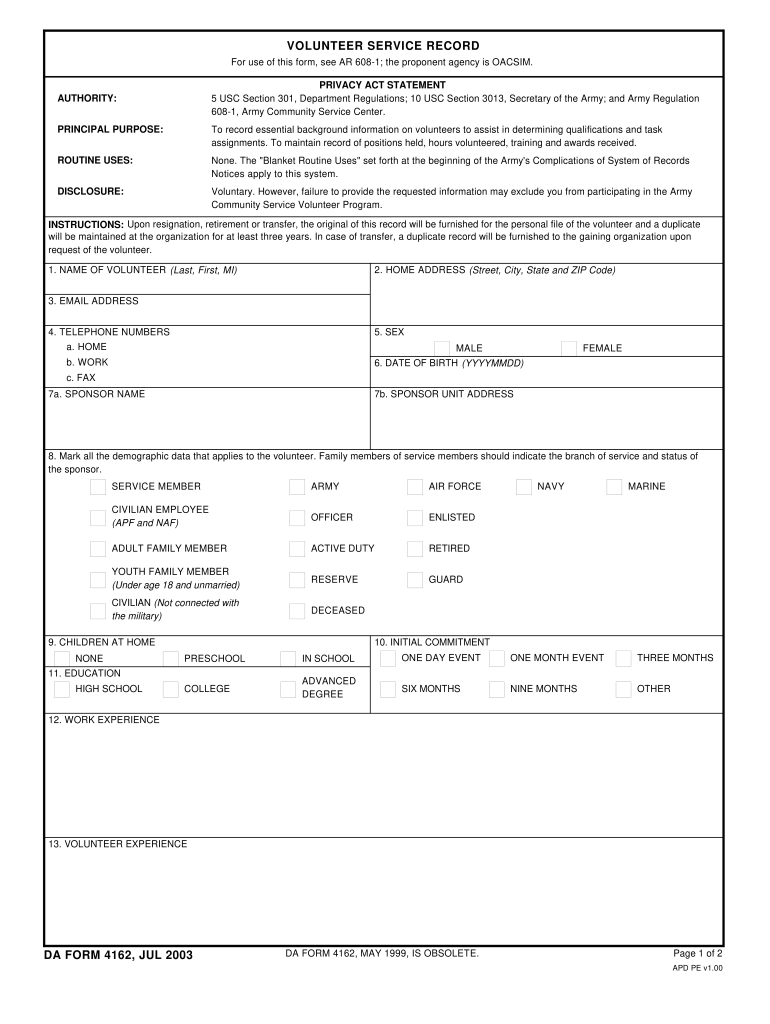
Y; and Army Regulation 608-1, Army Community Service Center. AUTHORITY: PRINCIPAL PURPOSE: To record essential background information on volunteers to assist in determining qualifications and task assignments. To maintain record of positions held, hours volunteered, training and awards received. ROUTINE USES: None. The "Blanket Routine Uses" set forth at the beginning of the Army's Complications of System of Records Notices apply to this system. DISCLOSURE: Voluntary. However, failure to p.

Open form follow the instructions

Easily sign the form with your finger

Send filled & signed form or save
How to fill out the DA 4162 online
The DA 4162 form is an essential document for recording background information on volunteers within the Army Community Service Volunteer Program. This guide provides step-by-step instructions to help users complete the form efficiently and accurately online.
Follow the steps to successfully fill out the DA 4162 form online.
- Click ‘Get Form’ button to obtain the DA 4162 form and open it in your preferred editor.
- Begin by entering the volunteer’s name in the first section, including last name, first name, and middle initial.
- Input the volunteer's home address, including street, city, state, and ZIP code, in the designated field.
- Provide the email address of the volunteer for communication purposes.
- Enter the volunteer's telephone numbers, including home, work, and fax numbers if available.
- Select the volunteer’s sex by marking the appropriate box for male or female.
- Fill in the date of birth in the format YYYYMMDD.
- For the sponsor details, enter the sponsor's name and unit address in the respective fields.
- Mark all applicable demographic data relating to the volunteer's service status, such as branch of service or if they are a family member.
- Indicate the number of children at home by marking 'None' or entering the applicable number.
- Select the initial commitment for the volunteer, identifying if they are involved in preschool, school, or events of various durations.
- List the volunteer's education background, starting from high school.
- Provide the details of work experience relevant to the volunteer role.
- Share any previous volunteer experience that may be applicable.
- Detail any special skills, interests, or hobbies that the volunteer possesses.
- Record positions held, including the start and end dates, type of position, awards received, and training completed.
- List any awards and special recognition received along with their presentation dates.
- Document any training undertaken with relevant dates.
- Compile the annual hour record for the volunteer, including the total hours for the year.
- Lastly, provide the signature of the volunteer along with the date of signing to validate the information.
- After completing all sections, save the changes, then download, print, or share the finished form as needed.
Complete your documents online today for a smooth volunteer experience.
Experience a faster way to fill out and sign forms on the web. Access the most extensive library of templates available.
Related content
is a sedative of the piperidinedione derivative family that was previously used for the...
Publicar trabalhos científicos sobre temas de medicina veterinária, zootecnia...
Technical changes which improve the performance of the device may be made without prior...
Get answers to your most pressing questions about US Legal Forms API.
How to record volunteer hours in the army?
To record volunteer hours in the Army, start by tracking each service activity and the corresponding hours. You will eventually need to fill out the DA 4162 form to capture this information officially. Consistency in logging your hours ensures that your volunteer efforts receive the proper recognition.
How do I add volunteer hours to VMIS?
Adding volunteer hours to VMIS involves logging into your account and selecting the option to add hours. You will enter the specifics of each activity and its duration. Keeping this data accurate is crucial, especially for submissions related to your DA 4162.
How to log hours on Volunteer Connection?
To log hours on Volunteer Connection, access your account and click on the log hours tab. Fill in the necessary details, including the activity description and the time spent. Ensure you align this logging with your DA 4162 submission for an efficient process.
How should I log my volunteer hours?
You should log your volunteer hours regularly to maintain accurate records. Use a simple template or spreadsheet to track the activities, dates, and hours spent. When submitting, ensure that the information aligns with the DA 4162 requirements for ease of processing.
How do you document your volunteer hours?
To document your volunteer hours, keep a record of each activity along with the date and duration. It's important to use the DA 4162 format if you are submitting hours for official recognition. This ensures your volunteer work is acknowledged and can benefit your future applications.
How to submit volunteer hours on VMIS?
To submit your volunteer hours on VMIS, simply log in to your account. Navigate to the volunteer section and enter your hours in the designated fields. Remember, documenting volunteer hours accurately is essential for your DA 4162 processing.
How do you qualify for the Army Outstanding Volunteer Service Medal?
To qualify for the Army Outstanding Volunteer Service Medal, you must log your volunteer hours using the DA 4162 form, demonstrating significant contribution over a specific period. Your service should reflect a commitment to improving community welfare and support for others. After meeting the necessary requirements, ensure your documentation is complete and submitted for consideration to your unit. Recognition of such dedication can lead to accolades and reinforce your professional profile.
How to show proof of volunteering?
To show proof of volunteering, present your completed DA 4162 form as documentation of your hours. This form serves as a formal record and is widely accepted as proof of your contributions. Additionally, retain any certificates or acknowledgments from organizations you volunteered with, as they can enhance your credibility. Combining these elements strengthens your case for recognition.
How are volunteer hours verified?
Volunteer hours are verified by the chain of command based on the submitted DA 4162 forms. Your unit will review the documentation for accuracy and legitimacy. It's crucial to ensure that the details are accurate to prevent any discrepancies. Verification may also involve cross-referencing with the organizations served during your volunteer activities.
How to officially track volunteer hours?
To officially track volunteer hours, utilize the DA 4162 form, which is recognized for documenting such contributions. Make sure to consistently record each activity, including times and descriptions. Keeping this information organized facilitates verification and reflects your dedication to service. This approach not only promotes transparency but also enhances your records.
Use professional pre-built templates to fill in and sign documents online faster. Get access to thousands of forms.
If you believe that this page should be taken down, please follow our DMCA take down process here.