Loading
Get Am Paipear
How it works
-

Open form follow the instructions
-

Easily sign the form with your finger
-

Send filled & signed form or save
How to fill out the Am Paipear online
This guide provides clear, step-by-step instructions for completing the Am Paipear application form online. Whether you have prior experience with similar forms or are filling one out for the first time, this guide is designed to help you navigate each section with ease.
Follow the steps to successfully complete the Am Paipear application form.
- Press the ‘Get Form’ button to obtain the application form and open it in your chosen document editor.
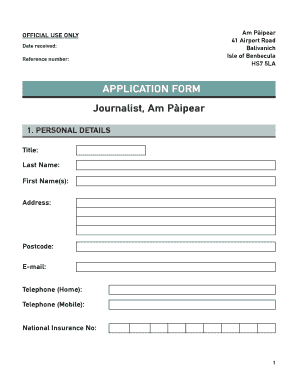
- In the first section labeled 'Personal Details', enter your title, last name, first name(s), address, postcode, email, home telephone, mobile telephone, and National Insurance number.
- Proceed to the 'Education and Training' section. List your qualifications achieved at school or in further education, including the qualification/level, subject, and grade. Then provide details of higher education, specifying the university/college, degree/qualification obtained, and duration.
- Continue to include any professional qualifications not previously mentioned, providing the qualification name, relevant body, and duration.
- In the 'Previous Employment' section, start by detailing your present or most recent employment. Include the name and address of the employer, the nature of the business, your position held, date appointed, date left (if applicable), notice period, and a brief outline of your duties and responsibilities.
- List your previous employment by providing the name and address of the employer, the nature of the business, dates of employment (from and to), post title, brief details of main duties, and reason for leaving.
- Next, fill out your personal statement, summarizing your career to date and explaining why you are the right candidate for the position. If necessary, continue on the reverse side or on additional sheets.
- In the 'General Information' section, answer questions regarding health and medical information, including any recurring health problems. Provide details of illness-related absences in the last three years, including dates and reasons.
- Respond to questions about criminal convictions, driving licenses, and language skills. Answer if you can speak, read, or write in Gàidhlig.
- Complete the disability information section, describing any reasonable adjustments you feel should be made in the recruitment process or in the job itself.
- Provide two references in the 'References' section, including their names, occupations, addresses, postcodes, and telephone numbers.
- Finally, read the declaration carefully, affirming the truthfulness of information provided. Sign and date the form to complete your application.
Begin filling out the Am Paipear today to ensure your application is submitted successfully.
Industry-leading security and compliance
US Legal Forms protects your data by complying with industry-specific security standards.
-
In businnes since 199725+ years providing professional legal documents.
-
Accredited businessGuarantees that a business meets BBB accreditation standards in the US and Canada.
-
Secured by BraintreeValidated Level 1 PCI DSS compliant payment gateway that accepts most major credit and debit card brands from across the globe.