Get Usps Ps 1583 2000
How it works
-

Open form follow the instructions
-

Easily sign the form with your finger
-

Send filled & signed form or save
How to fill out the USPS PS 1583 online
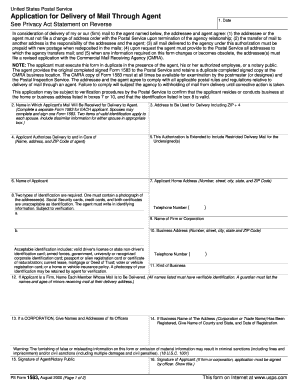
Filling out the USPS PS 1583 form is an important step for those who wish to authorize the delivery of their mail to an agent. This guide provides clear and detailed instructions on how to complete the form online, ensuring that users can easily navigate through each section.
Follow the steps to successfully complete your USPS PS 1583 online.
- Press the ‘Get Form’ button to access and open the form in the online editor.
- Enter the date on which you are completing the form in the designated field.
- Complete the section for the name in which the applicant's mail will be received for delivery to the agent. Remember, if there are multiple applicants, you will need a separate form for each person.
- Fill in the address to be used for delivery, including the ZIP + 4 code, to ensure accurate mail forwarding.
- In the next section, provide the name, address, and ZIP code of the agent who will be receiving the mail on behalf of the applicant.
- Indicate if this authorization extends to include restricted delivery mail for the undersigned.
- Enter the full name of the applicant in the specified field.
- Complete the applicant's home address fully, including the number, street, city, state, and ZIP code.
- Identify two types of acceptable identification for the applicant, ensuring the first includes a photograph. Be sure to note that Social Security cards, credit cards, and birth certificates are not acceptable.
- Provide the telephone number of the applicant in the designated area.
- If applicable, fill in the name of the firm or corporation associated with the applicant.
- Enter the business address for the firm or corporation, including the number, street, city, state, and ZIP code.
- Include the telephone number for the business in the specified field.
- Describe the kind of business in which the applicant is engaged.
- If the applicant is part of a firm, list the names of each member whose mail is to be delivered.
- For corporations, provide the names and addresses of its officers.
- If the business name has been registered, give the name of the county, state, and the date of registration.
- Finally, both the agent/notary public and the applicant must provide their signatures in the appropriate sections.
- Once the form is completely filled out, you can save your changes, download the completed form, print it, or share it as needed.
Start filling out your USPS PS 1583 online today to facilitate your mail delivery process.
Get form
Related links form
If you do not complete the USPS PS 1583 form, you may face challenges in receiving mail at your chosen mailbox provider. Without the form, your provider cannot legally accept and manage your mail. Consequently, your mail may be returned to the sender or potentially lost. To avoid these pitfalls, consider using US Legal Forms for straightforward templates and guides to help you fill out the form correctly.