Loading
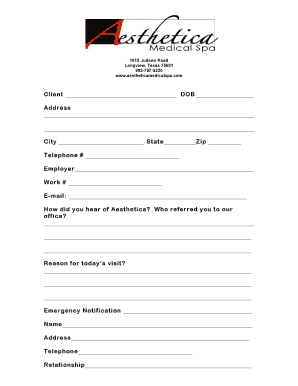
Get Client Info Sheet - Aesthetica Medical Spa
How it works
-

Open form follow the instructions
-

Easily sign the form with your finger
-

Send filled & signed form or save
How to fill out the Client Info Sheet - Aesthetica Medical Spa online
Completing the Client Info Sheet for Aesthetica Medical Spa online is a straightforward process that helps ensure you receive personalized care. Follow this guide to accurately fill out the necessary information and streamline your first visit.
Follow the steps to complete the Client Info Sheet efficiently.
- Press the ‘Get Form’ button to obtain the Client Info Sheet and access it through the editing platform.
- In the 'Client' field, enter your full name as it appears on your identification.
- Provide your date of birth in the designated DOB field, ensuring that the format is consistent with requirements.
- Fill in your complete residential address, including street, city, state, and zip code.
- Enter your telephone number in the specified field, making sure to include any necessary area codes.
- List your current employer’s name and your work telephone number in the respective fields.
- Input your email address clearly to ensure effective communication from the spa.
- Indicate how you heard about Aesthetica Medical Spa and the name of the person who referred you, if applicable.
- In the 'Reason for today’s visit?' section, briefly describe the purpose of your appointment.
- For emergency contact information, fill out the name, address, and telephone number of your emergency contact, as well as your relationship to them.
- Once all fields are completed, review the form for accuracy before proceeding to save, download, print, or share the document.
Start filling out your Client Info Sheet online now to ensure a smooth experience at Aesthetica Medical Spa.