Loading
Get Instrument Rental Agreement
How it works
-

Open form follow the instructions
-

Easily sign the form with your finger
-

Send filled & signed form or save
How to fill out the Instrument Rental Agreement online
The Instrument Rental Agreement is a crucial document that outlines the terms of renting an instrument. This guide provides step-by-step instructions to help you complete the agreement online efficiently and accurately.
Follow the steps to fill out your Instrument Rental Agreement
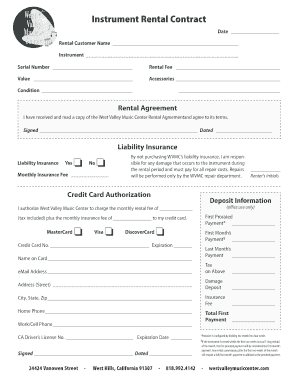
- Click ‘Get Form’ button to access the Instrument Rental Agreement and open it in your preferred online editor.
- Begin by filling in the date at the top of the form, ensuring you use the current date when submitting the agreement.
- Enter your name in the designated 'Rental Customer Name' field. This should be the name of the individual renting the instrument.
- Specify the instrument you are renting in the 'Instrument' section. Be sure to clearly identify the model and type.
- Next, input the serial number of the instrument in the provided space. This information helps to accurately track the rented item.
- Outline the rental fee in the appropriate field. You should verify the rental rate beforehand to ensure accuracy.
- Indicate the value of the instrument in the next section. This should reflect the fair market value of the item being rented.
- List any accessories that accompany the instrument in the designated area. This may include items such as cases, stands, or additional equipment.
- Describe the condition of the instrument at the time of rental. This helps to avoid misunderstandings regarding any pre-existing issues.
- Acknowledge receipt of the Rental Agreement by signing and dating the appropriate section at the bottom of the document.
- Choose whether you will purchase liability insurance by marking 'Yes' or 'No'. If opting not to purchase, be aware of your responsibility for any damage.
- If you select to get liability insurance, enter the monthly insurance fee in the specified field.
- Complete the credit card authorization section by entering your credit card details, including the card type, number, and expiration date.
- Fill out all details related to the first prorated payment, first month’s payment, last month’s payment, and any associated taxes.
- Provide your address, phone numbers, and CA driver's license number to verify your identity and ensure proper communication.
- Finally, review all the details you entered to ensure accuracy. Once confirmed, you can save changes, download, print, or share the completed agreement.
Complete your Instrument Rental Agreement online today for a seamless rental experience.
The agreement must be dated and signed by both parties, i.e. the landlord and the tenant. The agreement must be stamped and registered. Without a valid rental agreement, the rights and duties of the landlord and the tenant cannot be enforced or protected by law.