Loading
Form preview
  • US Legal Forms
  • Other Templates
  • More Forms
  • More Uncategorized Forms
  • Brabies Vaccination Certificateb - Wsu Extension - Extension Wsu

Get Brabies Vaccination Certificateb - Wsu Extension - Extension Wsu

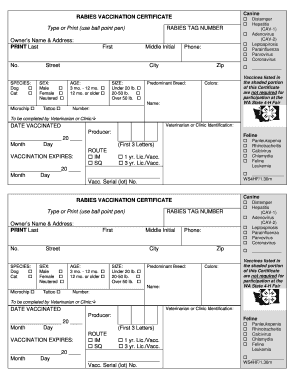
Canine RABIES VACCINATION CERTIFICATE Type or Print (use ball point pen) RABIES TAG NUMBER Distemper Hepatitis (CAV1) Adenovirus (CAV2) Leptospirosis Parainfluenza Parvovirus Coronavirus Owners Name.

How it works

  1. Open form

    Open form follow the instructions

  2. Easily sign form

    Easily sign the form with your finger

  3. Share form

    Send filled & signed form or save

How to fill out the Brabies Vaccination Certificate - WSU Extension online

The Brabies Vaccination Certificate is essential for pet owners seeking to record their animal's vaccination status. This guide provides clear and supportive instructions for completing the form accurately and submitting it online.

Follow the steps to fill out the Brabies Vaccination Certificate online

  1. Press the ‘Get Form’ button to access the certificate and open it in the form editor.
  2. Begin by entering the rabies tag number in the designated field provided at the top of the form.
  3. Fill in the vaccines received by selecting the appropriate checkboxes for distemper, hepatitis (CAV-1), adenovirus (CAV-2), leptospirosis, parainfluenza, parvovirus, and coronavirus.
  4. Provide the owner’s name by printing the last name, first name, and middle initial in the specified fields.
  5. Enter the owner's full address, including street address, city, state, and zip code.
  6. Indicate the species of the pet by checking either 'Dog' or 'Cat'.
  7. Choose the sex of the pet by selecting 'Male' or 'Female', and indicate if the pet is neutered.
  8. If applicable, check the boxes for microchip or tattoo identification.
  9. Enter the owner's phone number for contact purposes.
  10. Select the age category of the pet from the options provided: '3 mo. - 12 mo.' or '12 mo. or older'.
  11. Select the size category based on the pet's weight: 'Under 20 lb.', '20-50 lb.', or 'Over 50 lb.'.
  12. Provide the predominant breed and color of the pet in the respective fields.
  13. Enter the name of the pet in the designated section.
  14. The veterinarian or clinic will need to fill out their identification information and date of vaccination along with the route of administration (IM or SQ) and vaccination expiration date.
  15. Finally, select the license duration of the vaccination (1 year or 3 years) and document the vaccination serial number if applicable.
  16. Once all fields are completed, you can save changes, download the form, print it, or share it as needed.

Complete your Brabies Vaccination Certificate online today to ensure your pet's vaccination status is accurately recorded.

Get form

Experience a faster way to fill out and sign forms on the web. Access the most extensive library of templates available.
Get form

Related content

07-10-088 - WASHINGTON STATE REGISTER
May 1, 2007 — Hearing Location(s): WSU - Mount Vernon Northwestern Washington Research &...
Learn more
WSU Extension Publications|Rabies Vaccination...
This publication replaces C1105E ...Free
Learn more

Related links form

FHA Appraiser Independence Compliance Acknowledgement - Mycrescent Maryland Non Escrow Account Disclosure - Crescent Mortgage - Mycrescent Rhodeislandnoticeofnonrefundabilityofloanfees.doc - Mycrescent KENTUCKY CHOICE OF INSURANCE NOTICE - Crescent Mortgage - Mycrescent

Questions & Answers

Get answers to your most pressing questions about US Legal Forms API.

Contact support

Open the PDF document and select Sign from the top tools bar. Alternatively, from the All tools menu, select Fill & Sign. Create your signature and initials if not already done.

Sign PDFs for free with eSignature. Create a free eSignature account. Select “Start now”. Upload a PDF document that you want to sign. Check the “I'm the only signer” box. Click “Sign.” Drag and drop your signature from the left-hand navigation panel. Click Finish.

Open the image file in Word. Select the image and on the Picture Format tab, select Crop and use the handles to crop the image. Right-click the image and choose Save as Picture to save as a separate file. To add the signature to a document, select Insert > Picture s.

Create a digital signature in Gmail the Chrome Extension. Sign in or create an account. Access your account with Gmail. Open any email with an attachment. Select your signers: You'll see the options to choose who is signing. Finish and send.

How to do it Write your name on a piece of white paper using a ballpoint pen. ... Using your smartphone, tablet, or home scanner, take a photo or scan the image of your signature. Use digital tools like your smartphone editor or an online photo editor to neatly crop your handwritten signature to an acceptable size.

Get This Form Now!

Use professional pre-built templates to fill in and sign documents online faster. Get access to thousands of forms.
Get form
If you believe that this page should be taken down, please follow our DMCA take down processhere.
Get Brabies Vaccination Certificateb - WSU Extension - Extension Wsu
Get form
  • Adoption
  • Bankruptcy
  • Contractors
  • Divorce
  • Home Sales
  • Employment
  • Identity Theft
  • Incorporation
  • Landlord Tenant
  • Living Trust
  • Name Change
  • Personal Planning
  • Small Business
  • Wills & Estates
  • Packages A-Z
  • Affidavits
  • Bankruptcy
  • Bill of Sale
  • Corporate - LLC
  • Divorce
  • Employment
  • Identity Theft
  • Internet Technology
  • Landlord Tenant
  • Living Wills
  • Name Change
  • Power of Attorney
  • Real Estate
  • Small Estates
  • Wills
  • All Forms
  • Forms A-Z
  • Other Templates
  • Legal Hub
  • About Us
  • Help Portal
  • Legal Resources
  • Blog
  • Affiliates
  • Contact Us
  • Delete My Account
  • Site Map
  • Industries
  • Forms in Spanish
  • Localized Forms
  • State-specific Forms
  • Forms Kit
  • Real Estate Handbook
  • All Guides
  • Notarize
  • Incorporation services
  • For Consumers
  • For Small Business
  • For Attorneys
  • USLegal
  • FormsPass
  • pdfFiller
  • signNow
  • altaFlow
  • DocHub
  • Instapage
Form Packages
  • Adoption
  • Bankruptcy
  • Contractors
  • Divorce
  • Home Sales
  • Employment
  • Identity Theft
  • Incorporation
  • Landlord Tenant
  • Living Trust
  • Name Change
  • Personal Planning
  • Small Business
  • Wills & Estates
  • Packages A-Z
Form Categories
  • Affidavits
  • Bankruptcy
  • Bill of Sale
  • Corporate - LLC
  • Divorce
  • Employment
  • Identity Theft
  • Internet Technology
  • Landlord Tenant
  • Living Wills
  • Name Change
  • Power of Attorney
  • Real Estate
  • Small Estates
  • Wills
  • All Forms
  • Forms A-Z
  • Other Templates
Customer Service
  • Legal Hub
  • About Us
  • Help Portal
  • Legal Resources
  • Blog
  • Affiliates
  • Contact Us
  • Delete My Account
  • Site Map
  • Industries
  • Forms in Spanish
  • Localized Forms
  • State-specific Forms
  • Forms Kit
Legal Guides
  • Real Estate Handbook
  • All Guides
Prepared for you
  • Notarize
  • Incorporation services
Our Customers
  • For Consumers
  • For Small Business
  • For Attorneys
Our Sites
  • USLegal
  • FormsPass
  • pdfFiller
  • signNow
  • altaFlow
  • DocHub
  • Instapage
Social Media
Call us now toll free:
+1 833 426 79 33
As seen in:
© Copyright 1999-2026 airSlate Legal Forms, Inc. 17 Station Street, Ste. 203, Brookline, MA 02445
  • Your Privacy Choices
  • Terms of Service
  • Privacy Notice
  • Content Takedown Policy
  • Bug Bounty Program