Loading
Get Umr Post-service Appeal Request Form
How it works
-

Open form follow the instructions
-

Easily sign the form with your finger
-

Send filled & signed form or save
How to fill out the UMR Post-Service Appeal Request Form online
Completing the UMR Post-Service Appeal Request Form online can streamline your appeal process for a claim denial. This guide provides clear instructions to help you navigate each section of the form effectively.
Follow the steps to complete the appeal request form
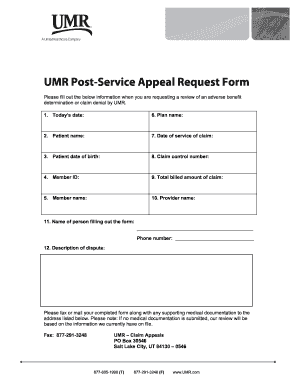
- Press the ‘Get Form’ button to access the UMR Post-Service Appeal Request Form and open it in your editing interface.
- Enter the date you are filling out the form in the designated field labeled 'Today’s date.' This helps establish the timeline of your appeal.
- In the 'Patient name' section, provide the full name of the individual for whom the claim was made.
- Fill in the 'Patient date of birth' field with the patient's date of birth to verify their identity.
- Input the 'Member ID' that is associated with the claim. This identification number is essential for processing your appeal.
- In the 'Member name' section, include the name of the primary member on the insurance policy.
- Provide the 'Plan name' under which the claim was submitted. This can typically be found on the member's insurance card.
- Enter the 'Date of service of claim' to specify when the service occurred related to the claim.
- Fill in the 'Claim control number' to ensure that your appeal is linked to the specific claim in question.
- Input the 'Total billed amount of claim' to indicate the full amount charged for the services received.
- In the 'Provider name' section, provide the name of the healthcare provider who delivered the services.
- Complete the section for 'Name of person filling out the form' with your name, followed by your phone number for any follow-up inquiries.
- Clearly describe the nature of your dispute in the 'Description of dispute' field. Be specific and concise to support your case effectively.
- Once all fields are complete, review the form for accuracy. Save your changes, download a copy, or print the form as needed.
- Submit the completed form along with any relevant medical documentation to the designated address or fax number provided.
Start completing your UMR Post-Service Appeal Request Form online today.
Related links form
The timely filing limit refers to the specified timeframe in which you must submit an appeal after a claim has been denied or processed. For many plans, including UMR, this limit often ranges from 120 to 180 days. Knowing and adhering to the timely filing limit when preparing your UMR Post-Service Appeal Request Form is vital for a successful appeal. Make sure to stay organized and proactive in tracking your claims.