Loading
Get Cardalertprabhubankcom Form
How it works
-

Open form follow the instructions
-

Easily sign the form with your finger
-

Send filled & signed form or save
How to fill out the Cardalertprabhubankcom Form online
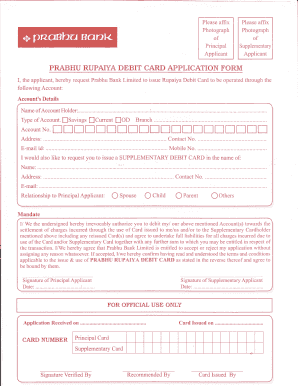
Filling out the Cardalertprabhubankcom Form online is a straightforward process that enables users to request a Rupaiya Debit Card efficiently. This guide will walk you through each section of the form, ensuring you provide all necessary information accurately and completely.
Follow the steps to fill out the Cardalertprabhubankcom Form online.
- Click the ‘Get Form’ button to access the form and open it in your editor.
- Fill in the account's details section. Choose the type of account: savings, current, or overdraft. Enter your account number, branch, and contact number.
- Provide your address in the specified field under the account details.
- If you are requesting a supplementary debit card, enter the name, address, and contact number of the supplementary cardholder.
- Indicate the relationship of the supplementary cardholder to the principal applicant by selecting from the options provided, such as spouse, child, parent, or others.
- In the mandate section, read carefully and affirm your agreement by signing and dating the designated lines.
- Ensure that you have provided all required information before finalizing the form. Review your entries for accuracy.
- After completing the form, you may save your changes, download a copy, print the form, or share it as necessary.
Complete your Cardalertprabhubankcom Form online today to enjoy convenient banking services.