Loading
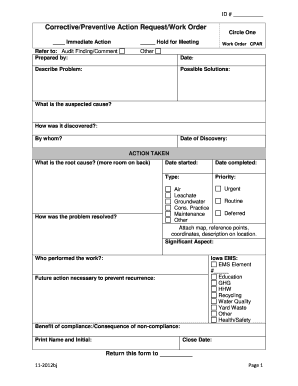
Get Cpar Form
How it works
-

Open form follow the instructions
-

Easily sign the form with your finger
-

Send filled & signed form or save
How to fill out the Cpar form online
Completing the Cpar form online can streamline your process for corrective and preventive actions. This guide provides clear instructions to ensure you fill out the form accurately and efficiently.
Follow the steps to fill out the Cpar form online effectively.
- Press the ‘Get Form’ button to access the Cpar form and open it in your preferred editor.
- Enter the ID number in the designated space at the top of the form.
- Indicate whether immediate action is required by circling the appropriate option: ‘Hold for Meeting,’ ‘Work Order CPAR,’ or ‘Other.’
- Fill in the date of submission in the section labeled 'Date:'.
- Describe the problem clearly in the 'Describe Problem' section, providing enough detail for understanding.
- In the 'Possible Solutions' area, list potential resolutions to the identified problem.
- Identify what is suspected to be the cause of the issue in the 'What is the suspected cause?' field.
- Record how the problem was discovered, including the name of the individual who discovered it and the 'Date of Discovery'.
- In the 'ACTION TAKEN' section, detail the root cause and how the problem was resolved, utilizing additional space if necessary.
- Input the 'Date started' and 'Date completed' for the actions taken.
- Select the type and priority from options provided, such as 'Urgent,' 'Routine,' or 'Deferred,' by marking the appropriate choices.
- Attach any relevant maps, reference points, or coordinates to offer clearer context for the location.
- Identify the significant aspect of the situation in the 'Significant Aspect' field.
- Document who performed the work and if applicable, complete the Iowa EMS section by entering the EMS Element number.
- Outline any future actions necessary to prevent recurrence in the designated section.
- Clarify the benefits of compliance and consequences of non-compliance in the respective fields.
- Finally, ensure to print your name and initials in the 'Print Name and Initial' section before completing the 'Close Date.'
- Once all sections are complete, save changes, download, print, or share the form as necessary.
Start filling out your Cpar form online today!
Because a CPARS rating is generally valid for 3 years (6 years for construction/architect-engineer contracts), a contractor may be inclined to challenge a negative CPARS if it believes it has been unfairly evaluated.
Industry-leading security and compliance
US Legal Forms protects your data by complying with industry-specific security standards.
-
In businnes since 199725+ years providing professional legal documents.
-
Accredited businessGuarantees that a business meets BBB accreditation standards in the US and Canada.
-
Secured by BraintreeValidated Level 1 PCI DSS compliant payment gateway that accepts most major credit and debit card brands from across the globe.