Loading
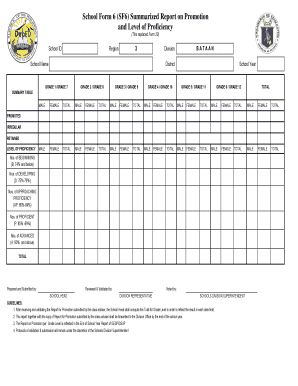
Get School Form 6
How it works
-

Open form follow the instructions
-

Easily sign the form with your finger
-

Send filled & signed form or save
How to fill out the School Form 6 online
School Form 6 is an essential document used to report student promotion and proficiency levels. This guide will provide you with step-by-step instructions to fill out the form online effectively.
Follow the steps to complete the School Form 6 online.
- Press the ‘Get Form’ button to access the form and open it in the document editor.
- Fill in the school ID, region, school name, and district in the provided fields. Ensure that all entries are accurate to avoid any discrepancies.
- Select the appropriate grade levels for the students being reported. You may need to fill out multiple grade sections from Grade 1 to Grade 12.
- In the Summary Table, record the total number of students, divided by gender (male and female), for each grade level. Ensure you accurately tally the numbers in accordance with your records.
- Input the number of students in each category of proficiency: Beginning, Developing, Approaching Proficiency, Proficient, and Advanced. These categorizations should reflect the assessment results of the students.
- Complete the qualifiers for promotion status, including those who are promoted, irregular, and retained. Ensure that this information aligns with your school's records.
- Once all fields are filled, review your entries for accuracy. Make any necessary corrections before proceeding.
- Finally, save the changes made to the form. You can choose to download, print, or share the completed form with relevant parties as required.
Take action now and start completing School Form 6 online to ensure a smooth reporting process.
HAZARD SUMMARY * Sulfur Hexafluoride can affect you when breathed in. * Sulfur Hexafluoride can irritate the skin causing a rash or burning feeling on contact. Direct skin contact can cause frostbite. * Sulfur Hexafluoride may cause severe eye burns leading to permanent damage.