Loading
Get Mcsr-application-limited-license-dentistdoc - Mass
How it works
-

Open form follow the instructions
-

Easily sign the form with your finger
-

Send filled & signed form or save
How to fill out the Mcsr-application-limited-license-dentistdoc - Mass online
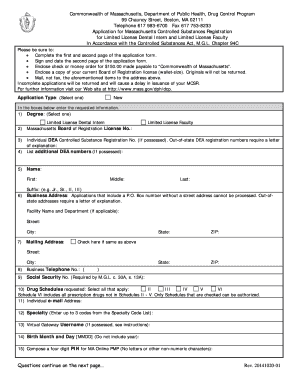
Filling out the Mcsr-application-limited-license-dentistdoc for limited license dental intern and faculty in Massachusetts is essential for controlled substances registration. This guide provides clear, step-by-step instructions to navigate the application process smoothly.
Follow the steps to complete your application accurately.
- Click the ‘Get Form’ button to obtain the form and open it in your preferred editor.
- Complete the first two pages of the application form by providing accurate personal and professional information. Make sure to choose your application type as either 'Limited License Dental Intern' or 'Limited License Faculty.'
- Enter your Massachusetts Board of Registration License Number in the designated field.
- If you possess an Individual DEA Controlled Substance Registration Number, fill it in along with any additional DEA numbers if applicable. For out-of-state DEA registrations, attach a letter explaining your situation.
- Fill in your full name, including first, middle, last, and any suffix if applicable.
- Provide your business address. Ensure that you include a street address, as applications with a P.O. Box number cannot be processed.
- Enter your mailing address. If it is the same as your business address, check the corresponding box.
- Include a contact phone number where you can be reached for any inquiries.
- Input your Social Security Number, as it is a requirement under state law.
- Indicate the drug schedules you are requesting by checking all that apply. Understand that selecting a higher schedule includes authorization for lower schedules.
- Provide a frequently monitored email address. This will be used for important updates regarding your application and the MA Online PMP.
- Enter up to three specialty codes from the Specialty Code List that best describe your practice.
- If you have a Virtual Gateway Username, fill it in. If not, leave this section blank.
- Fill in your birth month and day, omitting the year.
- Create a four-digit PIN for MA Online PMP, ensuring it contains only numeric characters.
- Answer whether you have ever been convicted of violations relating to controlled substances. Attach an explanation letter if you answer 'Yes.'
- Indicate if any professional license or registration you have held has been surrendered, revoked, suspended, or denied. Include an explanation letter if applicable.
- Read and agree to the terms and conditions for using the Massachusetts Online Prescription Monitoring Program (MA Online PMP).
- Sign and date the application form, attesting to the truthfulness of the provided information.
- Prepare a check or money order for $150.00 payable to 'Commonwealth of Massachusetts' and include a copy of your current Board of Registration license.
- Mail the completed form, payment, and required documents to the specified address. Do not fax the application.
Complete your Mcsr-application-limited-license-dentistdoc online today to ensure timely processing.
We register those who manufacture, distribute, dispense, possess, prescribe, or administer controlled substances. In Massachusetts, "controlled substances" includes all prescription drug products.
Industry-leading security and compliance
US Legal Forms protects your data by complying with industry-specific security standards.
-
In businnes since 199725+ years providing professional legal documents.
-
Accredited businessGuarantees that a business meets BBB accreditation standards in the US and Canada.
-
Secured by BraintreeValidated Level 1 PCI DSS compliant payment gateway that accepts most major credit and debit card brands from across the globe.