Loading
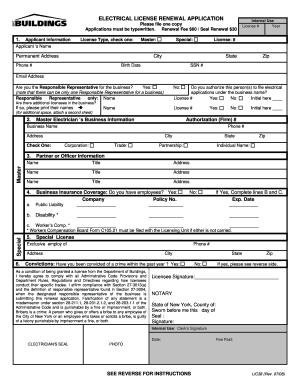
Get Nyc Buildings Lic38 2008
How it works
-

Open form follow the instructions
-

Easily sign the form with your finger
-

Send filled & signed form or save
How to fill out the NYC Buildings LIC38 online
Filling out the NYC Buildings LIC38 is an important step in renewing your electrical license. This guide will walk you through each section of the form to ensure that your application is complete and accurate.
Follow the steps to successfully complete your application.
- Press the ‘Get Form’ button to retrieve the LIC38 form and open it in your preferred document editor.
- Begin by filling out the applicant information. Select the license type by checking either 'Master' or 'Special'. Provide your name, permanent address, city, state, zip code, phone number, birth date, social security number, and email address.
- Indicate if you are the Responsible Representative for the business. You must tick 'Yes' or 'No'. If yes, provide the name of the Responsible Representative. Note that only one Responsible Representative can be designated for a business.
- Answer whether you authorize the person(s) indicated to file electrical applications under your business name. Indicate your response by ticking 'Yes' or 'No' and initialing as required.
- If there are additional licensees in your business, indicate that by selecting 'Yes' or 'No'. If 'Yes', print their names and license numbers as needed.
- Fill in the Master Electrician’s Business Information section by providing the Authorization (Firm) number, business name, business phone number, and address. Check the appropriate type of business: 'Corporation', 'Partnership', 'Trade', or 'Individual Name'.
- Enter the names, titles, and addresses for each partner or officer involved in the business.
- Complete the Business Insurance Coverage section by indicating if you have employees. If 'Yes', fill in the company name, policy number, and expiration dates for public liability, disability, and worker's compensation insurance as applicable.
- Address the Convictions section by indicating whether you have been convicted of a crime within the past year, answering 'Yes' or 'No'.
- After filling out all sections, don't forget to sign the form where indicated for the licensee signature.
- If applicable, complete the notary section by having the form notarized and provide the date and seal.
- Finally, review your form for accuracy and completeness. You can then save your changes, download a copy, print it out, or share it as needed.
Take action today and complete your NYC Buildings LIC38 online for a smooth license renewal process.
Get form
Experience a faster way to fill out and sign forms on the web. Access the most extensive library of templates available.
Related links form
Resolving a DOB violation in NYC requires you to identify the specific violation and submit the necessary documentation to the DOB. You may need to attend a hearing or resolve fines associated with the violation. When dealing with issues related to NYC Buildings LIC38, consider seeking advice from legal professionals or services like US Legal Forms to streamline the process.
Get This Form Now!
Use professional pre-built templates to fill in and sign documents online faster. Get access to thousands of forms.