Loading
Get Volante Asistencia Asepeyo
How it works
-

Open form follow the instructions
-

Easily sign the form with your finger
-

Send filled & signed form or save
How to fill out the Volante Asistencia Asepeyo online
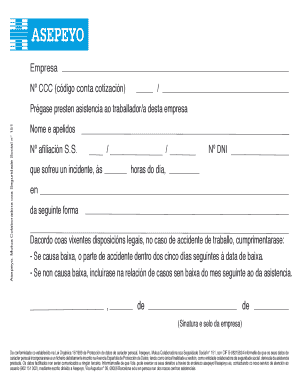
The Volante Asistencia Asepeyo is an important document for reporting incidents involving workers. This guide provides clear, step-by-step instructions to help you complete the form accurately and efficiently.
Follow the steps to complete the form seamlessly.
- Press the ‘Get Form’ button to access the Volante Asistencia Asepeyo form and open it in your digital editor.
- In the 'Empresa' section, provide the name of the company that employs the person who suffered the incident.
- Enter the 'Nº CCC' (código conta cotización), which is the company's Social Security contribution code.
- Fill in the section requiring you to request assistance for the affected worker, including their 'Nome e apelidos' (full name) and 'Nº afiliación S.S.' (Social Security number).
- Include details about the incident by entering the date and time it occurred in the fields marked 'ás' and 'horas do día.'
- Describe the incident in the provided field, ensuring you are concise and clear.
- Sign the form with the necessary signature and include the company's official stamp.
- After completing the form, ensure all sections are filled out correctly, then save your changes, and download or print the form for your records.
Complete your documents online today for a smoother submission process!
El volante de asistencia es un documento por el que la empresa solicita la atención médica del trabajador accidentado en el centro asistencial de la mutua.