Loading
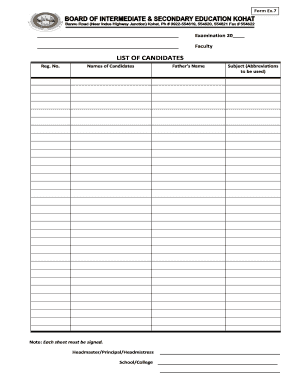
Get Form Ex7 Examination 20 Faculty - Bise Kohat
How it works
-

Open form follow the instructions
-

Easily sign the form with your finger
-

Send filled & signed form or save
How to fill out the Form Ex7 Examination 20 Faculty - BISE Kohat online
Filling out the Form Ex7 Examination 20 for the BISE Kohat can seem daunting, but with a clear and supportive guide, you can complete it with ease. This guide provides a step-by-step approach to assist you in accurately completing the form online.
Follow the steps to successfully complete the form.
- Press the ‘Get Form’ button to obtain the form. This will allow you to access the necessary document in the online editor where you can fill it out.
- Begin by entering the examination year in the provided space at the top of the form. Ensure the information is accurate as it relates to the current academic year.
- In the 'Faculty' section, specify the faculty relevant to the candidates listed. This helps in categorizing the candidates appropriately.
- Proceed to the 'List of Candidates' section. For each candidate, fill in their registration number in the corresponding field.
- Next, record the names of the candidates. Ensure that names are spelled correctly as they will be used for official records.
- In the 'Father’s Name' field, input the names of the fathers of each candidate, ensuring accuracy and completeness.
- Under the 'Subject' section, use the prescribed abbreviations for the subjects the candidates are registered in, ensuring they align with official documentation.
- Remember to sign each sheet of the form as required. This maintains the integrity of the document.
- Finally, include the signatures of the headmaster, principal, or headmistress as necessary. This validation is crucial for the form's acceptance.
- Once all information is accurately filled out, review the form for any errors. After confirming the information is correct, save your changes, and you can download, print, or share the completed form as needed.
Complete your Form Ex7 Examination online today for a smooth submission process.
Check Result By SMS: The last suggestion for students is to check the BISE Kohat board result 2023 by SMS. The designated code to check Kohat board result is “8583”.
Industry-leading security and compliance
US Legal Forms protects your data by complying with industry-specific security standards.
-
In businnes since 199725+ years providing professional legal documents.
-
Accredited businessGuarantees that a business meets BBB accreditation standards in the US and Canada.
-
Secured by BraintreeValidated Level 1 PCI DSS compliant payment gateway that accepts most major credit and debit card brands from across the globe.