Loading
Get Bresidential Application Formb - Royaland
How it works
-

Open form follow the instructions
-

Easily sign the form with your finger
-

Send filled & signed form or save
How to fill out the BResidential Application Form - Royaland online
Filling out the BResidential Application Form - Royaland online is a crucial step in securing your desired rental property. This guide will walk you through each component of the form, ensuring that you complete it accurately and efficiently.
Follow the steps to complete your application form online.
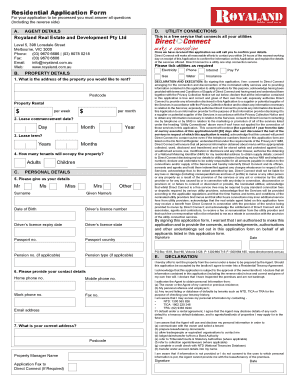
- Press the ‘Get Form’ button to acquire the application form and access it in your preferred editor.
- Begin by entering the property details, including the full address, rental price per week or month, lease commencement date, and lease term.
- Specify the number of tenants who will occupy the property, including the number of adults and children.
- Proceed to fill in your personal details, ensuring you provide accurate information, including your name, date of birth, driver's license number, passport details, and any relevant pension information.
- Select the utilities you wish to connect by ticking the appropriate options, such as electricity, gas, water, and telecommunications.
- Read and acknowledge the declaration regarding your consent for Direct Connect to arrange utility services and share your information with utility providers by signing the form.
- Fill in your contact information and current address, along with details of your previous residential address.
- Provide your employment and income details, including occupation, employer information, and length of employment.
- List any references, including personal contacts and emergency contacts, ensuring that they are not related to you.
- Upon completion, review the information for accuracy, then proceed to save changes, download, print, or share the completed application form.
Complete your BResidential Application Form - Royaland online today to streamline your rental application process.
Include contact information, your current address, and any other details that will emphasize your positive attributes as a renter. Also including a timeline for the move, any hobbies and interests, basic employment information, and any other personal attributes will set you apart from others.